
For graduate students only.
- Sign in to Quest.
- Select the Academics tile.

- Select the Graduation tab on the left.

- In the Program section, verify the accuracy of the degree and academic program. Note: Previous awarded degrees can be viewed by selecting View Graduation Status.

- Select the Apply for Graduation link.
- Important: If you have met the requirements for a diploma or specialization in addition to your degree, you will not be able to apply for it here. Please email your graduate coordinator to let them know.

- Important: If you have met the requirements for a diploma or specialization in addition to your degree, you will not be able to apply for it here. Please email your graduate coordinator to let them know.
- Select the Expected Graduation Term from the drop-down list. Note: Your expected graduation term should be the term in which you will finish your degree requirements.

- Review the displayed graduation instructions, then select Continue button at the bottom of the screen.

- On the Verify Graduation Data page, verify the accuracy of the Degree and Expected Graduation Term information.

- If correct, select Submit Application at the bottom of the screen.

- If correct, select Submit Application at the bottom of the screen.
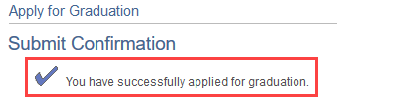
- A confirmation message will be displayed.
- Reselect the graduation link on the left to reload the page.
- In the Program section, select the View Graduation Status link.

- Under the Student Information section, review your legal name and mailing address. If you your legal name and/or mailing address are incorrect, update your personal information.
