The University of Waterloo Libraries provides access to thousands of electronic resources, including databases, ejournals and ebooks. These resources cost a significant amount every year and come with specific licence terms that outline how they can be used.
If license terms are violated, vendors may suspend or permanently revoke access to the individual or the University. Misuse of the University’s computing and network resources may also lead to disciplinary action. For more information, see the IST Guidelines on use of Waterloo computing and network resources.
Use the guidelines below to help you use library resources appropriately.
Guidelines
Appropriate use of library resources
You may use reasonable amounts of content (e.g., journal articles, book chapters, database content) for:
- Your own academic or scholarly work
- Your own individual or internal research
For teaching (e.g., LEARN/Hive), research with external parties (e.g. working with researchers from another institution), or when you need large amounts of content (such as through text and data mining), check the license terms for the resource in Omni, the library catalogue.
If you have questions, contact copyright@uwaterloo.ca.
Check usage rights in Omni
License agreements set out specific rules to follow when using electronic resources.
Use the following steps to find usage rights for Libraries licensed content.
- Search for the title (either of the article or the journal) you want to use in the Libraries' catalogue.
- Click on the title.
- Scroll down to 'View Online'. If there is more than one source, find the source that has the coverage that you need.
- Click 'Show License'.
Remember that the license summary simply shows whether you can use the content. You still need to adhere to fair dealing amounts to guide your use of 'how much' content. For example, one chapter or up to 10% of a book, or one article per issue of a journal.
The following usage rights are listed in the catalogue:
| Usage right | Permission to: | What will appear |
|---|---|---|
| Digitally copy | download a digital copy for personal use | Permitted/Prohibited |
| Print copy | print a copy for personal use | Permitted/Prohibited |
| Electronic link | link to the resource | Permitted/Prohibited |
| LEARN use permitted | upload materials to LEARN or other course management systems | Yes/No/Ask |
| eReserves permitted | upload materials to eReserves | Yes/No/Ask |
| Course packs permitted | use materials in a print course pack | Yes/No/Ask |
| Scholarly sharing | share minimal amounts of materials with a third party (a person outside the University) for personal, educational, or research purposes (never for commercial purposes) | Permitted/Prohibited |
| ILL permitted | share a resource with a requesting library | Yes/No/Ask |
| ILL ecopy | share a resource with a requesting library's patron in electronic copy | Yes/No/Ask |
| Text and data mining permitted | text/data mine a resource within the publisher's provided parameters | Ask/No |
| AI use | use a resource with artificial intelligence tools (e.g. Copilot). See more about Use of library resources with AI | Yes/No |
Example
You want to use the following article as assigned reading, and want to upload the PDF of the article to LEARN or Perusall:
Lustig, R., Schmidt, L. & Brindis, C. The toxic truth about sugar. Nature 482, 27–29 (2012) doi:10.1038/482027a
Once you've located the article or journal in the catalogue, click on the entry.
In the 'View Online' section you'll see all the sources where full text access for the particular item exists. Find the source that provides access to the content you want, and click 'Show License' on the right-hand side of the page.
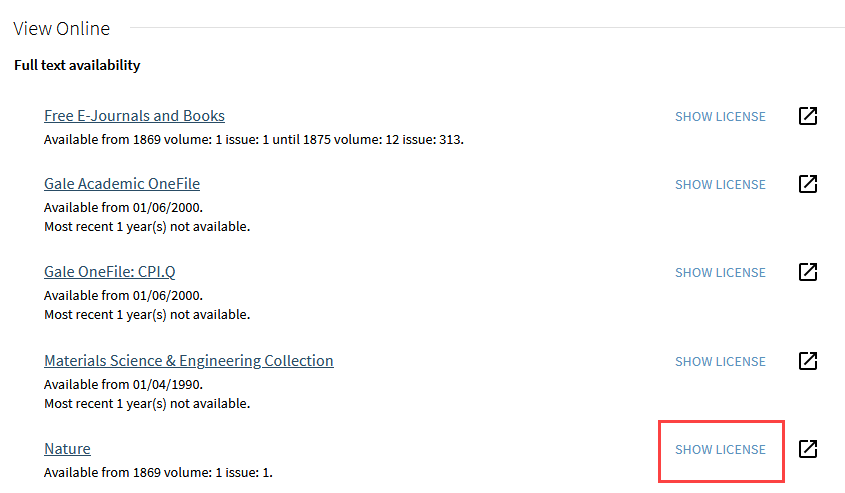
The View Online section of the Omni record for the journal Nature. Each source of full text availability has a "Show License" button.
Clicking the 'Show License' section will display all of the usage rights for the content from that provider. Look for your intended use to see if the license permits that action. In this case the license permits use in LEARN.
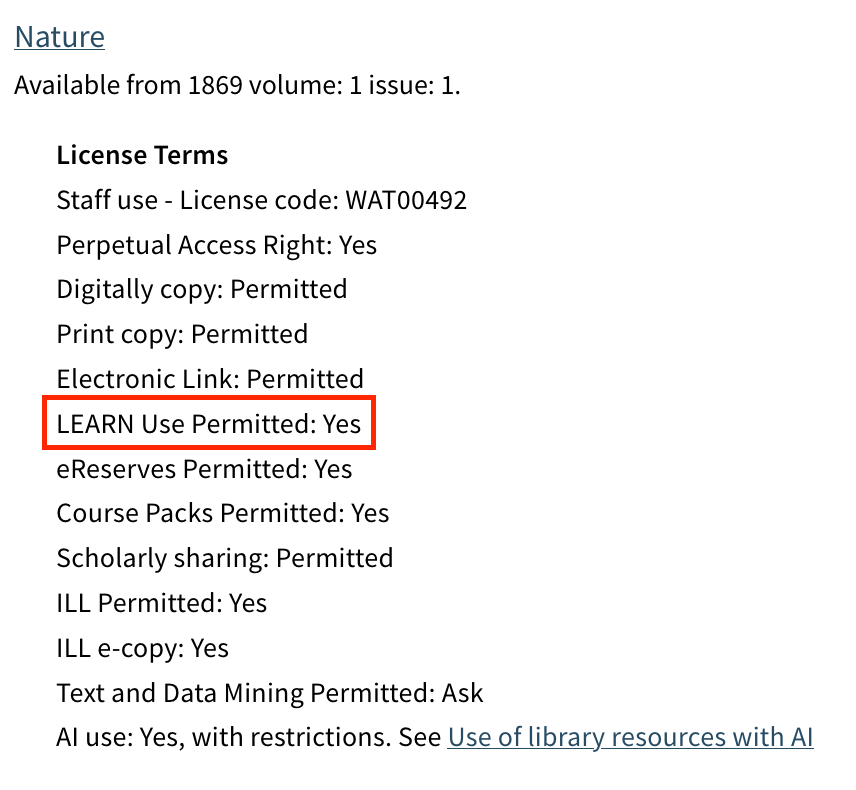
The License Terms section in Omni shows all the relevant license permissions for the journal. You can see here that LEARN Use is permitted.
Contact us
Please contact copyright@uwaterloo.ca if:
-
License permissions are labelled "Ask" in Omni
-
You can't find permissions listed
-
You are looking for usage rights for a database
-
You have any questions about your intended use
Restrictions on use of library resources
The following uses of licensed content are not allowed:
Commercial use
Examples include:
- Selling content
- Sharing content with, or providing access to an employer
Systematic or excessive downloading
Examples include:
- Systematic or large-scale downloading, printing or copying
- Automated downloading using robots or intelligent agents
- Manually downloading many items in rapid succession
Sharing content outside the University
Do not upload or distribute licensed content to:
- listservs
- academic social networks (e.g., ResearchGate, Academia.edu)
- third-party generative artificial intelligence (GenAI) platforms (e.g., ChatGPT)
- For more information about using the Libraries’ resources with GenAI tools, see Use of resources with AI.
Altering content
Do not:
- Change or remove copyright statements
- Edit or alter the source content in any way
- You may annotate (e.g., highlighting, comments, or notes, etc.)
Important warning about excessive use
Excessive use may lead to suspension of access for you or the entire campus.
Excessive use includes:
- systematic downloading or web scraping
- rapid manual downloads, such as downloading all articles from a single journal issue)
Use caution with batch download features in citation management tools, such as:
- Endnote (Find Full Text)
- Zotero (Find Available PDF/Find Full Text)
These features may trigger excessive downloading alerts.
Questions?
If you have questions about these guidelines or about the use of a specific resource, contact:
Lauren Byl, Copyright & Licensing Librarian
Email: copyright@uwaterloo.ca
Phone: 519-888-4567, extension 42356