Log in to the WCMS page you're on!
You can use shortcuts to quickly log in to a WCMS 3 page you need to edit.
Ensure your caps lock isn't on - this shortcut only works with a lowercase 'L'.
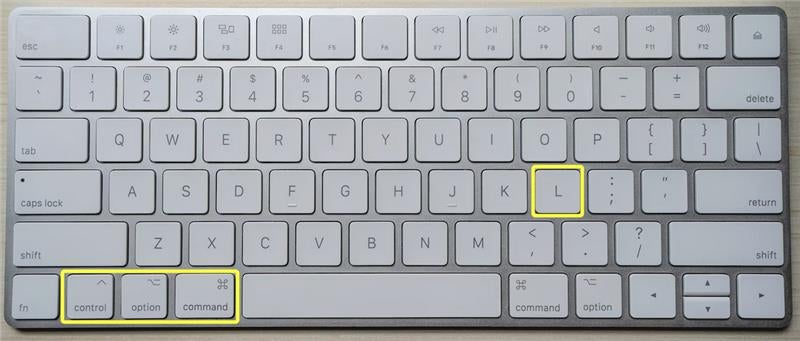
On a Mac
Press the control+option+command+L keys at the same time to log in.
On a PC
Press the control+windows key+alt+L keys at the same time to log in.

Templates are your friend
With WCMS 3 Templates, you can save layouts, including blocks and their contents, and easily add them to any content type (excluding the Site footer, Sidebars and Expand/Collapse groups).
This feature is particularly useful for maintaining consistent formatting or incorporating the same content (e.g., related links, social media links) on various pages. You can save individual sections or entire layouts as templates.
For more information, refer to the WCMS Knowledge Base Templates how-to documentation.