Course Reserves is a service that works with instructors to make course materials available to students
Accessing Course reserves
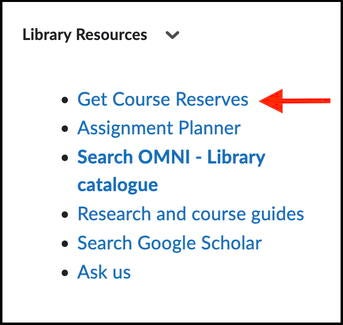
- From Waterloo LEARN, click on the "get course reserves" link in the libraries resources widget on your course home page.

- From the Libraries home page, click on Course Reserves in the "Quick Links" menu.
When logging into Course Reserves, use your WatIAM username and password.
Information for Instructors
Benefits of using Course Reserves
Types of course reserve materials
Loan period for physical reserves
To create a new course reserves list
To add materials to a reserves list
Benefits of using Course Reserves
- We help you provide students with more equitable access to course materials.
- We ensure that links to e-journal articles and e-books for your course readings are persistent.
- We are your legal means of digitizing copyrighted material.
- We apply Fair Dealing Advisory guidelines and when necessary seek permission from copyright holders to purchase licences when available and affordable.
- We link to your course reserve list from the library resources widget in LEARN.
- With Course Reserves, you can
- Create and manage course reserve lists for the current term.
- View lists from previous and upcoming terms.
- Clone a course reserve list for a future term or import items from previous courses.
- Designate a proxy user: A course teaching assistant can add reserves to a course on your behalf; a full proxy can create new course reserve lists for you as well as add new items to all your existing reserve lists.
- Track the status of reserve requests.
- Subscribe to email notification to be updated when new items become available on reserve for your course.
- Assign tags to individual reserve items.
- Switch to student mode to view your course reserves as students see them.
- Get usage statistics for electronic and physical reserves using instructor course tools.
Types of course reserve materials
- Library books, textbooks, DVDs, and CDs.
- Links to materials within our licensed electronic resources such as our ejournal subscriptions and ebooks.
- Material for which we have purchased a transactional license or that qualifies under the Fair Dealing Advisory.
- Digital materials for which permission has been granted.
- Materials belonging to instructors, such as assignment questions/solutions, for which they own the copyright, and personal copies of books.
The Libraries will not accept responsibility for personal or departmental copies on course reserves that are damaged, not returned, or are lost in transit through campus mail.
Loan periods for physical reserves
Instructors can choose from the following loan periods:
- One hour
- Three hours
- One day — due by desk closing the following day
- Three days — due by desk closing on the fourth day
Setting up Course Reserves
Log in to Course Reserves using your WatIAM username and password. You will be taken to the instructor main menu.
To create a new course reserves list
- Click the "create a new course" option under instructor course tools on the side menu (link to video).
To add materials to a reserves list
- Open a course from the list of current or upcoming courses and select the "add reserve items" option under instructor course tools from the side menu.
- You can also clone a reserves list (link to video) from a past term or import items from a previous list(s).
- Using the library catalogue (Omni) to request articles for Course reserves (PDF)
- Use the paper request form at the Library’s help desk.
When the term ends
- If a course is not being taught in the following term material will be taken off reserve (unless we are otherwise notified).
- If needed, library books and personal materials of instructors can be left on the course reserve shelves indefinitely. Please contact Course Reserves.
- Expired course reserve lists are retained and can be found under "previous courses" in the instructor tools section of the Course Reserves website. Previous courses can be cloned to a future term. Permissions will be renewed for items that require copyright clearance.
Additional resources
- Copyright guide for instructors
- LEARN course Copyright_OvervieUW (Copyright Overview for Waterloo Instructors and Staff)
- The course is listed under the "self-registration" section in LEARN
- Ontario Bill 166 (2024) and the Mandatory Disclosure of Course Fees
Information for students
- Course reserves may include electronic and physical items.
- For physical reserves, you may borrow two items at a time.
- Physical reserves may be taken out of the Libraries, but must be returned to the location where they were borrowed.
- Physical reserves may be borrowed an unlimited number of times and renewed in person only if another copy is available on shelf. If all copies of a reserve item are out on loan, you will have to wait 15 minutes before borrowing the item again.
- Fines for overdue reserves:
- Five cents per minute to a maximum of $100 per item for one-hour and three-hour loans.
- $20 per day to a maximum of $100 per item for one-day and three-day loans.
Service Standards
The Libraries strive to meet the following service standards. Please note that these standards apply only to course reserves handled at the Dana Porter and Davis Centre libraries.
Processing time
Requests are processed in the order they are received.
- Requests submitted at least six weeks before a term begins will be available by the start of classes.
- Requests for material available in the library’s collection that are submitted during the term will be fulfilled within 5 business days.
Certain exceptions may lead to processing delays.
Exceptions:
While library staff strive to meet posted turnaround times, certain situations may be beyond our control and delay the processing of a request. Instructors will be informed if a significant delay is anticipated.
General:
- Volume of requests during peak periods (end of an outgoing term and start of a new term).
Electronic item requests:
- Items requiring a transactional licence or permission from the rights holder.
- Items requiring digitization.
Physical item requests:
- Print books that need to be ordered.
- Books out on loan that are recalled.
- Books that are missing.
- Material that is awaiting supply by instructor.
Communication
- Library staff will respond to inquiries sent to library.reserves@uwaterloo.ca within one business day.
- Instructors are emailed a reminder 6-8 weeks before the start of a new term to submit their requests.
- A notice will be posted on the library home page for any service disruptions.
Accessibility
The Libraries aim to make course reserves materials accessible in compliance with the Accessibility for Ontarians with Disabilities Act (AODA).
- Apply OCR (Optical Character Recognition) technology and tag PDFs posted on electronic reserve to make them navigable, searchable and readable.
Requests for alternative formats are managed through Library Accessibility Services (LAS).
Copyright and licensing
All materials made available through Course Reserves will be processed in compliance with Canadian copyright law and the University of Waterloo’s copyright guidelines and licence agreements.
Library staff will investigate additional licensing for materials that exceed copyright guidelines.
Contact Us
- Email: library.reserves@uwaterloo.ca
- Dana Porter Library: 519-888-4567 ext. 43648
- Davis Centre Library: 519-888-4567 ext. 43761