Delegation FAQ

I SET UP DELEGATION FOR APPROVALS AND TASKS, BUT MY DELEGATE ISN'T SEEING THE APPROVAL REQUESTS OR TASKS.

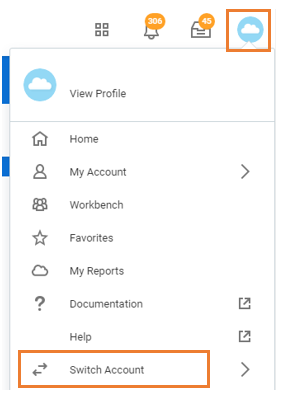
Ensure your delegate is clicking the cloud icon/profile picture and selecting Switch Account to act on your behalf. Available tasks (business processes) will be displayed on the home page of the delegation dashboard and approvals will be available in the delegation inbox.
I DELEGATED THE ABSENCE CALENDAR SO THAT OTHER MANAGERS IN MY DEPARTMENT CAN SEE WHEN MY TEAM MEMBERS HAVE BOOKED VACATION, BUT THEY CANNOT SEE IT.

The Absence Calendar cannot be delegated for someone to see the Team Absence Calendar on another manager’s team. In order to view approved absence requests for members on another team, you can go into each individual team member’s Time Off summary to see their approved requests.

CAN I SET UP A DELEGATION SO THAT SOMEONE ON MY TEAM CAN VIEW ONE OF THE MANAGER REPORTS AVAILABLE TO ME?

Reports cannot be delegated. Most reports can be downloaded to excel so you can download and share them when appropriate

IF I SET UP A SUBSTITUTE IN UNIT 4 FOR SIGNING AUTHORITY, HOW DOES THAT TRANSLATE TO WORKDAY?

Signing Authority substitutes in Unit 4 are brought over into Workday as the Signing Authority on the accounts in Workday. This means that the substitute will receive Workday approval actions for new hires and time entry (when the cost center is overridden) for the accounts they are listed as a substitute for in Unit 4.