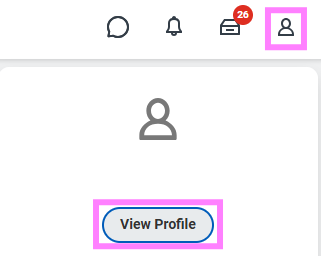
- At the top right of the Workday screen, click the profile icon to select View Profile.
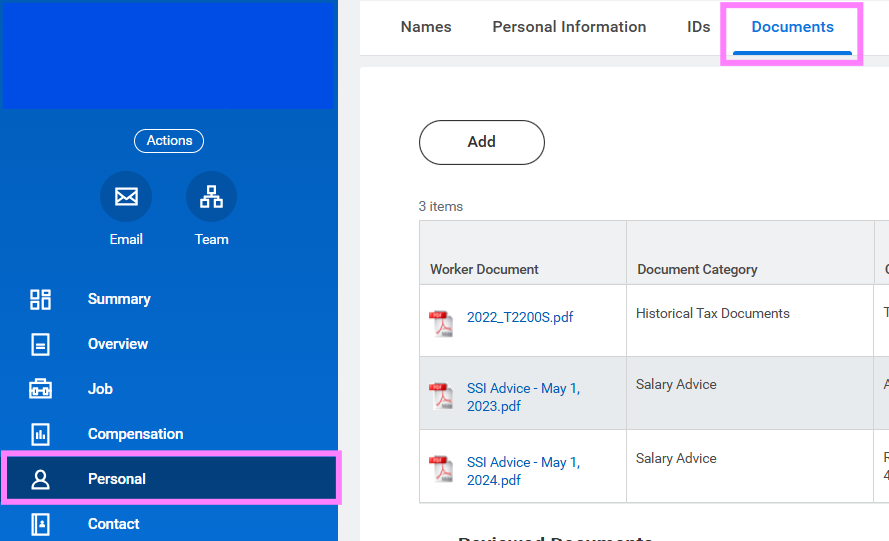
- Click Personal under your Worker Profile (blue menu on the left) and then click the Documents subtab.
- Review the documents Workday has on file for you.
You can access up to 7 years of tax documents on Workday. If you require documents from prior periods, please contact hrhelp@uwaterloo.ca.
T4 and T4A slips are listed by year, slip type (T4/T4A), and company
- UW – University of Waterloo
- CWN – Canadian Water Network
- CGC – Conrad Grebel University College
- REN – Renison University College
- UC – United College
- Faculty and Staff Association Fees slips are listed by type and year*
* These tax slips are now sent directly to the employees by their association.
Please note: If you are not currently working at the University and have "terminated" listed on your account, you can access your tax documents from the Personal Information application (on the home page under View All Apps) > View > Worker Documents.