Employment Equity is a program legislated by the federal Employment Equity Act. This is an optional survey but it is very important to complete to help ensure the University of Waterloo is a fair and equitable place to work. Even if you do not complete the survey, you will need to submit the instructions page from your Workday Inbox to complete your onboarding. If you choose to complete the survey, this task will need to be completed from your Worker Profile by following the instructions below.
Note: You will not be able to complete this task until on or after your start date, when your employee profile is active.
- Select the cloud icon/your profile picture on the top right hand corner to navigate to your worker profile.
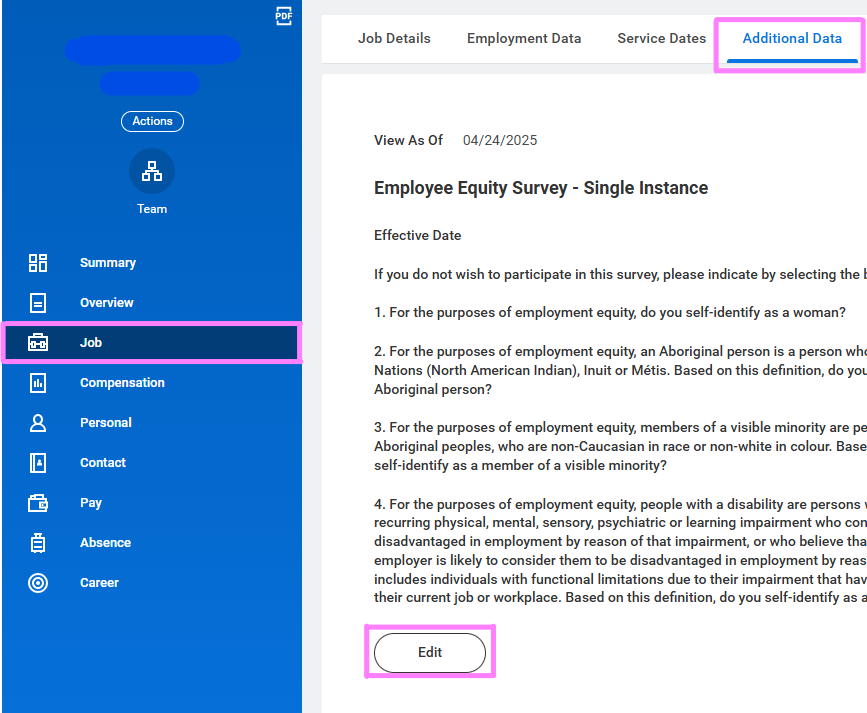
- Click the Job tab and from the Additional Data option, click Edit.
- Update your Employment Equity Information.
- Once complete, navigate back to your Workday inbox and Submit the Complete Self Identification inbox task to finalize the transaction and complete your onboarding.