Sensitivity Labels coming to UW's Microsoft 365 environment
What’s happening?
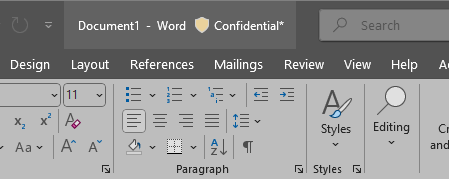
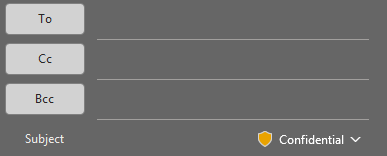
Information Systems and Technology (IST) is enabling sensitivity labels in the University of Waterloo Microsoft 365 environment. This means you will see a new sensitivity icon on Microsoft application documents and emails (see examples below).
- Sensitivity labels apply only within Microsoft applications and files (e.g. Word, Excel, PowerPoint). Other files are not affected or supported (e.g. data files, PDF*)
- Labels will be assigned for new emails sent using Outlook.
- New files and emails will be labelled as “Confidential” by default.
- To assist in classification, the label definition/description will appear when you hover your cursor over the label
- Existing files stored in Teams, OneDrive, SharePoint will be automatically labeled as “Confidential”.
- Existing files on local drives, the Faculty of Health R: drive, and research network storage will not have sensitivity labels applied automatically.
- Sensitivity labels will be applied to accounts with a M365 employee license.
* While sensitivity labels cannot be viewed, created, or edited in PDF files, the sensitivity label is embedded in a file if it is exported as a PDF from a Microsoft application.
Why this change?
Microsoft recommends sensitivity labels as a best practice, and they will be required to access certain Microsoft 365 services in the future. They also help improve data privacy and security across our organization.
When it’s rolling out
Sensitivity labels will be enabled starting May 12, 2025. Automatic labeling of existing files stored in Teams, OneDrive, SharePoint will begin at that time and may take several weeks to months to complete.
What do I need to do?
For most files and emails, confidential is an appropriate designation (i.e. not ‘public’ but not ‘restricted’ or ‘highly restricted’) and will be assigned by default.
If you are responsible for any files that require a higher classification than 'Confidential', please begin reviewing and updating their sensitivity labels starting May 12. It is recommended to begin this work, as soon as possible.
To modify a document’s sensitivity label (or to set a sensitivity label to a document outside of Teams, SharePoint and OneDrive):
- Open the file using the appropriate Microsoft application
- Upon opening, the file will get a “Confidential” label assigned/displayed
- Change the label if appropriate (click on the label and choose the desired label)
- The label will be saved when the file is saved.
Learn more
Visit the Microsoft 365 Sensitivity Labels knowledge base page for guidance on how to use and apply labels appropriately.
Sensitivity Label in Outlook
Sensitivity Label in Word