Overview
We used GeoScenario Server to implement an open-source scenario suite of 2026 Euro NCAP crash avoidance scenarios. The suite contains three additional scenarios reconstructed from video evidence.
To support this project, we implemented many improvements to GeoScenario Server, including a forced-collision algorithm for path pedestrians (PP) and path vehicles (PV) agent types.
Visit EURO NCAP Crash Avoidance Scenarios repository page for scenario descriptions, execution videos, and installation and usage instructions.
The scenarios can be used to test automated driving systems via support for co-simulation.
Contributions
The project demonstrates how NCAP scenario definitions can be instantiated in a practical way.
Ensured collision algorithms
NCAP scenario definitions are quite rigid, specifying exact speeds of the scenario participants making it difficult to execute scenarios to cause the collision and force the reaction of the VUT.
In fact, it is possible that the VUT passes the scenario test not because it took the right action and avoided the collision but because the scenario was executed in a way that did not require the VUT to react.
We extended the implementation of path agents, path pedestrians (PP) and path vehicles (PV), in GeoScenario Server to
- Support full speed profile paths allowing for controlling speed, acceleration, and time to acceleration in path nodes,
- Allow agents with provided initial speed to adjust their speed to ensure a collision with the given vehicle,
- Allow agents with fixed constant speed to begin movement at the right time to ensure a collision with the given vehicle,
- Allow agents to determine the collision point dynamically or use a fixed (designated) collision point on the agent's own path.
These capabilities required extending the modelling language GeoScenario 2.
Ensuring the collision enables robust NCAP scenario execution with externally controlled vehicles (EV) that may not exactly follow the prescribed speeds.
The figure below demonstrates the dynamic collision point selection for a crossing pedestrian compared to a fixed collision point on VUT's path indicated by red. Given the sharp right turn of the VUT, the dynamic collision point extrapolated from VUT's heading moves away from the pedestrian requiring the pedestrian to increase the speed rapidly in order to ensure the collision. Whereas, the fixed collision point allows the pedestrian to simply approach the collision point in a more consistent manner.

Compositional scenarios
Each scenario consists of a base scenario and scenario parts. The scenario parts can be included in all possible combinations to extend the base scenario and create specific scenario variants.
For example, the scenario below provides five pedestrians approaching from different directions, two sets of occluding vehicles, five vehicles under test: three automated (SDV) to demonstrate the scenario and two external (EV) to allow for testing with an external automated driving system. Users can create a scenario variant by selecting any combination of the seven agent parts and one VUT part.
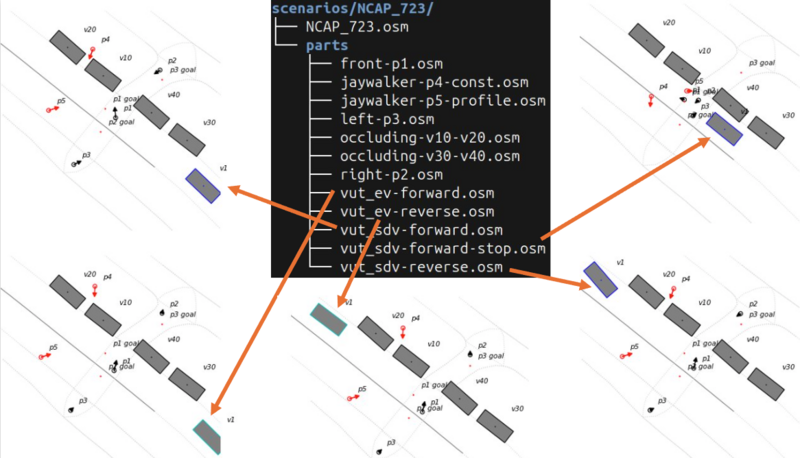
Scenario variants for various VUT choices.
Scenario aliases
Often, NCAP scenarios are particular variants of more general scenarios. We support that reuse using scenario aliases, which are files specifying the base scenario and a selection of parts.
The scenario suite provides nine scenario aliases. For example:
- NCAP_CBNAO = NCAP_CBC right_pb4.osm occluding_pv10_pv20.osm
- NCAP_CCCscpfto = NCAP_CCCscpf farside_occlusion.osm road_tightly_occluded.osm
- NCAP_CCFtapo = NCAP_CCFtap occlusion.osm
- NCAP_CPNCO = NCAP_CPC occluding_pv30_pv40.osm right_pp2.osm
The users execute scenario aliases directly just like regular scenarios by selecting the desired VUT parts.
Native ROS2 server for lock-step execution
The original GeoScenario Server supports standalone simulation and co-simulation only in real-time.
We implemented a native ROS2 GeoScenario Server which supports faster (or slower) than real-time lock-step co-simulation, whereby the co-simulator controls the simulation time and GSS only performs a simulation step in response for the given delta time.

Illustration of the lock-step execution of ROS2 GeoScenario Server and a co-simulator
We also provide a mock co-simulator that can be used to drive GSS in various ways:
- real-time with the given delta time,
- faster or slower than real-time with the given delta time and real time factor,
- as fast as possible in real-time with the given delta time.
Where the delta time refers to the duration of the simulation step in simulation time. The real time factor (rtf) determines whether the execution of the simulation in real time is slower or faster than real time:
0 < rtf < 1- faster than real time,rtf = 1- real timertf > 1- slower than real time
For example, a real-time factor of 0.5 results in the real-time simulation execution being half of the simulation duration in simulated time.
General improvements
GeoScenario Server matured significantly with improvements to usability (dashboard, options), stability, packaging (wheel, conda), and distribution implemented in over 70 pull requests. We officially released version v0.1.1 and we provide binary builds for easy installation.

Screenshot of a full window of GSS executing a test scenario containg all agent types with the OpenStreet map overlay.