Table of Contents
Best practices & Guiding principles
Projects & Initiatives – Accessibility improvements
Projects & Initiatives – Fact finding
Community feedback and engagement
Appendix 1 – Summary Report of Findings
Appendix 2 – VPAT Score Tracking Spreadsheet
Appendix 3 – Site Improve Issues List Document
Executive summary
While there is still work to be done to fully understand the digital and web accessibility landscape at the University of Waterloo (UWaterloo), the institution has made a strong and commendable start. Numerous initiatives by multiple groups across campus reflect a growing commitment to inclusive digital experiences.
While Waterloo is beholden to accessibility compliance standards set forth by the Accessibility for Ontarians with Disabilities Act (AODA), there is currently no formal mandate requiring accessibility compliance for web applications, only public-facing websites. However, there is a clear and widespread desire within the Waterloo community to support and uplift all users, including those with accessibility needs. This institutional momentum provides a strong foundation for future progress in the digital accessibility space.
The scope and impact of future recommendations will ultimately depend on the level of institutional commitment to accessibility. This includes recognizing the broader complexities involved in implementing sustainable and scalable accessibility practices, as well as recognizing the current resourcing and financial constraints on the institution.
Despite existing challenges, Waterloo is actively prioritizing accessibility, with many positive efforts already underway. Any future work to enhance the accessibility of web applications would build on this momentum and should be coordinated with others doing work in this space to avoid duplicate, redundant, or conflicting efforts. Establishing centralized oversight and involving subject-matter experts (SMEs) and accessibility professionals in future initiatives will be critical to ensuring consistency, efficiency, and long-term success.
Background
IST has a program in place to ensure that Equity, Diversity, Inclusion and Anti-Racism (EDI-R) practices are embedded into practices in the day-to-day work of IST staff. As part of this commitment to equity, Waterloo has initiated efforts to establish a more equitable software environment that caters to the needs of all users, including those with accessibility requirements and those who use assistive technology.
To accomplish this, IST launched a project that aims to catalogue and evaluate the existing software applications based on the guiding principles of Web Content Accessibility Guidelines (WCAG) 2.0 for web content accessibility and the Accessibility for Ontarians with Disabilities Act (AODA).
The first version of WCAG criteria was first introduced by W3 in 1999 with the goal of making web content more accessible. The first major revision, WCAG 2.0, then came in 2008 and introduced four main principles of WCAG, often referred to as POUR:
- Perceivable: Information must be perceivable to users, regardless of their sensory abilities.
- Operable: Users must be able to interact with all elements of a web page.
- Understandable: Content and functionality must be understandable.
- Robust: Content must be compatible with current and future assistive technologies.
Beyond this, WCAG 2.0 also refined conformance guidelines, separating out the guidelines into 3 different conformance levels:
- A = the minimum level requirements any website should be able to meet.
- AA = the mid-range conformance level that represents strong accessibility.
- AAA = the highest level of conformance, providing exceptional accessibility, but unachievable for certain content.
This project was launched to gain insights into the current software landscape at UWaterloo and provide vital information for future initiatives to move towards a more equitable software environment by determining how web applications perform against WCAG criteria.
Accessibility at Waterloo
At Waterloo, there are currently a number of staff who support members of the Waterloo community with accessibility-related needs and accommodations in an official capacity as part of their job description. Beyond this, there are many groups and individuals working to improve accessibility across campus. Much of the work being done across campus is covered on the website, Accessibility at Waterloo. Additionally, the following links highlight some specific accessibility initiatives on campus:
- Digital Accessibility Resources and Community of Practice (DARC)
- Disability Affinity Program (includes Accessibility Ally Network).
- Disability Inclusion Steering Committee (DISCo)
- CTE’s list of accessibility initiatives at Waterloo
This is by no means an exhaustive list but should act as a helpful starting point for anyone with an accessibility-related need or question on campus. Given the accessibility-focused lens of this project, only accessibility at UWaterloo was reviewed for this project, but inclusion of all EDI-R programs would yield even more results and resources available on campus.
Furthermore, as a higher-education institution in Ontario, UWaterloo is required to adhere to the standards and requirements set forth by AODA. This means that organization's websites should conform with WCAG 2.0 Level AA standards. Presently, this standard applies only to public-facing websites, not web applications as targeted for this work. Additionally, while there is currently no mandate, AODA has pushed forward recommended guidelines for universities and colleges, including those which address barriers around digital learning and technology. While these recommendations may or may not go into effect, regardless of whether this becomes mandated, Waterloo should still strive to follow the recommendations in order to create a more accessible and equitable landscape for everyone, whether students, staff, faculty, or community members.
Software at Waterloo
In anticipation of this work, a project was completed to create an inventory of applications supported centrally by IST. The inventory project identified approximately 300 centrally supported applications, reflecting the diverse range of tools maintained by IST. However, many of the applications were deemed outside the scope of this work for various reasons, such as integrations that solely possess an API without a user interface, or firmware for devices. To refine the scope, the following inclusion criteria were established for this initial project with the intention that lessons learned from this project could help direct future work with larger scopes:
- The application is used by or supports a Waterloo business area outside IST,
- The application has a web interface and is accessed via a web browser,
- IST has an active and ongoing relationship with the business partner,
- Includes support of the application or central funding.
By including these inclusion criteria for this project, the number of applications in scope for this project was reduced to 145 applications. This includes both vendor-purchased applications and custom-developed and open-source applications. Of these applications, 22 of them are software that was custom developed at UWaterloo or open-source, and the remaining 123 are vendor-procured software.
Project approach
Given the extensive range of applications in scope and the limited resources available for comprehensive testing with various assistive technologies, it was decided that this project would concentrate on gathering objective data to establish an initial understanding of the current state of software accessibility. The data used for this analysis includes:
- Accessibility data from Voluntary Product Accessibility Template (VPATs),
- Accessibility data from Waterloo’s web accessibility tool, SiteImprove,
- Wherever possible, user population impact and the business-critical functionality:
- This contextual information helps to interpret accessibility findings more meaningfully by understanding the scope of the impacted population and the extent to which the application is critical to business functionality, which may influence how accessibility barriers are prioritized and addressed.
Although this project does not aim to fulfill specific legislative requirements, it is important to note that WCAG standards represent the benchmark for web accessibility. Furthermore, WCAG information is readily available through both SiteImprove and most vendor-provided VPATs, as detailed below, making it sensible to focus on this data for analysis.
About SiteImprove
SiteImprove is a web application designed to help organizations improve their website's quality, accessibility, and compliance by performing automated scanning and testing. One of its key features is its ability to assess and provide detailed insights into web accessibility based on WCAG success criteria.
Waterloo procured SiteImprove in early 2023 to enhance digital accessibility efforts by monitoring and remediating public-facing websites for content quality and accessibility. In September 2023, SiteImprove introduced a feature enabling the scanning of credentialed websites, thereby facilitating the scanning of web applications for this project.
SiteImprove supports both automated and manual scanning through a browser extension. Upon completion of an automated scan, SiteImprove provides various accessibility metrics, including an overall score out of 100 for each WCAG level (A, AA, AAA), and a list of identified issues. SiteImprove is designed to scan websites at regular intervals, tracking changes in these metrics over time. In order to perform manual scans, a browser-based extension is needed. When using the browser-based extension, users will see a pop-up listing any WCAG issues on the current page, but no reports or data are generated beyond that.
Accessibility details provided by SiteImprove
Within SiteImprove, there are a number of dashboards available, including an accessibility overview dashboard. This dashboard displays a SiteImprove accessibility score out of 100 on 5 different accessibility-related criteria sets: WCAG Level A, WCAG Level AA, WCAG Level AAA, Web Accessibility Initiative - Accessible Rich Internet Applications (WAI-ARIA), and accessibility best practices. Beyond this, there is an overall accessibility score.

These scores are derived by crawling the domain and programmatically checking each page against success criteria for these sets and tracks whenever there is an issue. Depending on the severity and prevalence of the issues, SiteImprove will lower the score. Therefore, if no issues are found from the scan, that web application will receive a perfect score of 100. In addition to providing the overview data, SiteImprove also produces a report that lists what these issues are found as well as a number of related fields including: the conformance/success criteria, an estimation of difficulty to remediate, the responsibility, element type, abilities that are impacted, number of occurrences, number of pages, and the web address and title of any pages where they were found. These reports were saved where available to help support any future initiatives.

Please note: The data for WAI-ARIA and accessibility best practices were captured and saved in issue reports, but overview data was not saved nor used in analysis due to the focus of WCAG for this body of work.
About VPATs
The VPAT stands for Voluntary Product Accessibility Template. It is a template that companies can use that breaks down the criteria and standards for the accessibility of a given product. There is no “pass/fail” scale for determining whether a product is accessible or inaccessible. Rather, the various criteria on the VPAT will give a holistic picture of the specific accessible features provided by the tested product or service. Please note that a completed VPAT is technically called an Accessibility Conformance Report (ACR). However, the term VPAT is used much more broadly than ACR and this report has followed this common understanding of terms to avoid confusion.
There are four different versions of the VPAT with various levels of information expected:
- WCAG – contains WCAG criteria,
- 508 – contains Section 508 criteria (which includes WCAG 2.0 Level AA),
- EU – contains EN 301 549 criteria (which includes WCAG 2.1 Level AA data), and
- INT – contains all of the above data.
For each of these versions, there are different revisions which introduce improvements, such as aligning with changes to WCAG criteria as they are updated, allowing for more detailed explanations within the report, enhancements to instructions, etc. So, while many versions of the VPAT exist, with some key differences across them, they nearly all have nearly identical VPAT criteria which allows for a comparison of WCAG data across products even when a different VPAT version is used.
Please note, there is no certification process for vendors, but rather, VPATs only offer a template for vendors to share details about the accessibility of their product in a standard format.
Development of a Numeric Score for VPATs
For each success criterion within the VPAT document, an answer of one of the following is expected: Not Applicable, Does Not Support, Partially Supports (or Supports with Exceptions), and Supports. Because of the scope of this work, it was determined that these values needed to be converted into more easily understandable, quantitative data in order to look at accessibility trends for these applications. This section examines how this was achieved and discusses how this data was used.
To score the VPAT a value is assigned to each possible response, as follows:
|
Response |
Score |
|---|---|
|
Not Applicable/Not Answered |
NULL (not included in calculation) |
|
Does Not Support |
0 |
|
Partially Supports/Supports with Exceptions |
1 |
|
Supports |
2 |
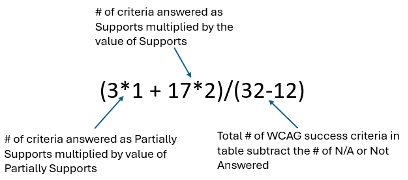
Once each of the respective Success Criteria Tables has been answered, an average score will be calculated for that set of Success Criteria. It was determined that calculating an average rather than a total score would provide the best insight into the application’s relative accessibility. This is so applications aren’t penalized for “N/A” responses. For instance, if the software does not include video components, there would be no expectation of video captions, and the criterion would be marked as N/A. Similarly, if the published VPAT is from a version released prior to the introduction of specific criteria, it would be marked as N/A. In both scenarios the application should not and would not be penalized for not having an associated score.
In addition to creating a single score for each application, this method also allows for the calculation of an average score for each of the WCAG success criteria to better understand which success criteria are most and least supported by software applications at UWaterloo. For the full spreadsheet of scores, please see Appendix 1.
Example scoring
There are 32 total success criteria in Table 1 (WCAG level A). For the application SimplyVoting, the breakdown of answered questions is in the following:
|
Response |
# of items |
|---|---|
|
Not Applicable/Not Answered |
12 |
|
Does Not Support |
0 |
|
Partially Supports/Supports with Exceptions |
3 |
|
Supports |
17 |
Using these values, the average is then calculated using the following formula to calculate the average score for WCAG Level A Success Criteria of 1.85:
Additional considerations on VPATs
There are currently three levels of WCAG Criteria (A, AA, and AAA). Of the 114 VPATs reviewed for this project, only sixteen included WCAG Level AAA data. SiteImprove accessibility report provides data on all three levels of WCAG (A, AA, AAA) criteria by default. Presently, any AODA requirements around WCAG conformance only require up to WCAG level AA. However, the purpose of this work is not based on legal requirements but rather to promoting equity across Waterloo’s campus. The data for WCAG level AAA has been documented within this report but are not used in any analysis or considerations due to lack of meaningful data from VPATs.
Calculation of overall risk category
This risk category has been designed to help prioritize application-specific accessibility remediation efforts based on available data. It incorporates three key dimensions:
- Accessibility Score: Based on automated SiteImprove scanning, and VPAT data.
- Population Impact: The size and diversity of the user base.
- Functional Criticality: The importance of the application to business operations.
Accessibility risk should be interpreted within a broader context. While numerical scores offer a baseline, the true measure of accessibility lies in how an application is used and by whom. The University of Waterloo does not currently enforce a minimum accessibility standard, but accessibility is typically considered during the procurement of new systems. As such, even applications flagged as Risk Category A may not require remediation if they are able to meet the accessibility needs of users without problems. However, the advantage of the numerical score is that it expresses relative urgency, helping stakeholders prioritize which issues may warrant closer attention based on comparative risk.
The risk categories are as follows:
|
Risk category |
Description |
|---|---|
|
A |
Accessibility is poor or unknown for applications with high population impact or enterprise-wide usage. These are the highest priority for review and potential remediation. |
|
B |
Accessibility is poor or for applications with medium or low user populations. These are the next highest priority for remediation. |
|
C |
Accessibility is unknown for low/medium populations or has minor issues. These should be reviewed as capacity allows. |
|
D |
Accessibility is relatively good, or the application is scheduled for retirement. Action should focus on confirming retirement timelines or monitoring for regressions. |
Please note:
- Risk prioritization may also consider additional contextual factors, such as user-reported concerns. For instance, feedback from the IST contact for a specific application highlighted usability issues raised by end users which may not have otherwise been reflected in other data sources.
- Moreover, the absence of key data, such as accessibility data or functional criticality data, can itself be a risk factor. As such, when information is missing, particularly in these areas, the risk category level may increase, even if no specific issues have been identified.
Limitations
While this report aims to provide a comprehensive analysis, it is important to acknowledge various limitations that may impact the findings and conclusions. Some of these limitations are inherent to the nature of web development and accessibility, while others are more specific to the project approach. Recognizing these limitations helps to contextualize the results and identify areas for future improvement. This section aims to explore various limitations with this work and provide context and discussion for each.
Inherent Limitations
Before addressing the project-specific approach, it is important to acknowledge some inherent limitations of this work. While these limitations are unavoidable, they should be understood and recognized within the context of the findings.
|
Lim.# |
Description |
Impact |
|---|---|---|
|
1 |
Web accessibility is recognized to be about continuous ongoing improvement rather than assuming a product is ever fully accessible. |
While it would be ideal to reach an end-state of completely accessible web applications, there will always be areas of improvement and challenges accessibility.2 That doesn’t mean that improvements cannot be made, but it should be understood that accessibility is about continuous improvement rather than reaching an end state. |
|
2 |
Most web applications receive regular updates which may change their ability to meet accessibility needs. |
Due to the dynamic nature of development and the web, any information on accessibility should be considered within a point of time. With any application, there could be an update that introduces changes that would impact accessibility:
|
|
3 |
This project has a relatively large scope of applications in scope which differ greatly from each other. |
The extensive range of applications involved in this project adds significant complexity to the user experience across the products. Given the diverse array of applications and user interactions, it can be challenging to define a singular user experience in certain cases. Examples of this complexity include:
|
Despite these limitations, the insights and recommendations derived from our work remain valuable. By understanding the constraints, stakeholders can make informed decisions and appreciate the context within which our analysis was conducted. The goal of this work is to provide actionable insights that drive meaningful improvements, even within the boundaries of these inherent limitations.
SiteImprove limitations
As mentioned above, one source of accessibility data was gathered using Waterloo’s digital accessibility tool, SiteImprove. The following are limitations with SiteImprove which were noted during this work.
|
Lim.# |
Description |
Response |
Action |
Impact |
|---|---|---|---|---|
|
1 |
SiteImprove does not support automated scanning of applications with 2FA authentication. |
Mitigate |
Create a WatIAM account that is 2FA exempt. |
By creating a 2FA-exempt WatIAM account, any application that is authenticated using Waterloo’s SSO will bypass 2FA and allow for scanning. Some applications do not use UWaterloo’s SSO and may have their own built-in 2FA which cannot be circumvented and is therefore ineligible for scanning. |
|
2 |
SiteImprove does not support automated scanning of applications that are behind a VPN, Citrix Gateway, etc. |
Accept |
N/A |
Any application that is only available behind VPN, Citrix Gateway, or is otherwise not available to the public is ineligible for scanning. |
|
3 |
SiteImprove scans the entire application and cannot differentiate between custom content for generating an accessibility score. |
Accept |
N/A |
Some accessibility scores by SiteImprove may be artificially lower due to user-created custom content creating accessibility issues in SiteImprove. |
|
4 |
SiteImprove may be able to update/delete data, and/or initiate application processes depending on how the application has been built. |
Mitigate |
Limit scanning to non-production environments unless there is certainty that the application will not cause issue, the application is non-business critical, and there is a backup recovery plan in place. |
Adding constraints to which environments are scanned increases the number of applications that are ineligible for scanning. Many of the vendor product applications in scope allow for free individual or trial accounts which are not associated with UWaterloo’s environment. Whenever possible, this approach was taken in order to further reduce the risks caused by this limitation. A decision tree was created (See Appendix 4) and application admins/business unit contacts were consulted to determine the appropriate path forward for scanning for each application. |
|
5 |
SiteImprove’s Information Risk Assessment (IRA) had only considered public data and has not been properly vetted for any types of restricted, confidential, or otherwise non-public information. |
Accept |
N/A |
Some contacts for applications that are used for more sensitive data requested not to have their application scanned due to privacy concerns. However, due to limitation #4, many non-production environments were scanned thereby reducing the risk of any exposed data. |
|
6 |
Some applications block IP addresses, preventing SiteImprove from completing an automated scan. |
Mitigate (where possible) |
Where possible, a temporary IP exception was put in place to allow for scanning. |
Some vendor products were ineligible for scanning due to the IP blocking. |
|
7 |
In some instances, other unknown technical issues prevented SiteImprove from completing a scan. For example, Microsoft credentials that otherwise worked would not resolve to complete the automated crawl. |
Accept |
N/A |
Many Microsoft web applications would time out and not authenticate during SiteImprove’s automated crawl. |
|
8 |
SiteImprove can’t differentiate between high-level and low-level content with apps integrated into other apps. |
Accept |
N/A |
Turnitin, Creator+, and Performance+ are typically only accessible through LEARN and it was not possible to generate a unique score for each application. However, a LEARN test environment was scanned before and after these modules were enabled and issue’s list compared. Any newly reported issues have been included in the analysis. |
|
9 |
Automated accessibility scanning does not capture all accessibility issues. |
Accept |
N/A |
Due to lack of resources for comprehensive testing, we must accept that SiteImprove will not be fully accurate. However, it should be expected that SiteImprove would be similarly inaccurate to all products scanned. |
VPAT limitations
As VPATs are publicly available, vendor-authored documents, their limitations must be acknowledged and accepted as part of the evaluation process. The following is a list of limitations noted in this work.
|
While VPATs are intended to provide a standardized format for reporting accessibility, the evaluation methods used can vary significantly between vendors. The quality of the VPAT is heavily dependent on the expertise of the individual completing it. Some vendors may employ accessibility experts who use robust testing methods, while others might rely on less experienced staff, leading to inconsistencies in the accuracy and thoroughness of the report. |
||||
|
2 |
Voluntary nature and Accountability |
Accept |
N/A |
The VPAT is a voluntary document, meaning there is no mandatory enforcement of its accuracy. This voluntary nature can lead to discrepancies between reported accessibility and the actual user experience. |
|
3 |
Potential for Outdated Information |
Accept |
N/A |
Another limitation is the potential for the VPAT to contain outdated information. Accessibility standards and best practices evolve over time, and a VPAT that was accurate at the time of its creation may no longer reflect the current state of the product's accessibility. |
Discussion of limitations
While tools such as Siteimprove and Voluntary Product Accessibility Templates (VPATs) provide valuable insights into the accessibility of our web applications, it is important to acknowledge their inherent limitations. These constraints may affect the completeness and precision of the data. However, the findings still offer a meaningful starting point for understanding and improving accessibility across our digital platforms.
Despite the individual limitations of each data source, the use of multiple tools in combination enhances the overall reliability of the assessment. Cross-referencing findings from different methodologies increases confidence in the results and supports a more balanced view of accessibility performance.
Where feasible, efforts were made to mitigate or account for known limitations. However, some constraints are intrinsic to the tools or the nature of the evaluation process. Recognizing these limitations not only fosters a more realistic understanding of the current state but also enables more informed decision-making. Furthermore, these insights can guide future initiatives by highlighting areas where process improvements or alternative approaches may reduce similar limitations going forward.
Findings
The Summary Report
This section presents key insights extracted from the summary report provided in Appendix 1. For a comprehensive overview of the dataset and additional supporting details, please refer to the full report, Appendix 1.
Risk category
The following section presents a detailed analysis of the data broken down by risk category and other relevant fields. These results highlight key trends, patterns, and insights that inform our understanding of the underlying risk landscape.
Risk category vs. Population Impact Matrix
The table below presents a cross-tabulation of applications categorized by Risk Category (A–D) and Population Impact. This matrix provides a snapshot of how applications are distributed across varying levels of risk and organizational impact, based number of users, offering valuable insights into areas of concentration and potential exposure. This view supports prioritization efforts and informs risk mitigation strategies.
|
Risk category |
Enterprise |
High |
Medium |
Low |
|---|---|---|---|---|
|
A |
4 |
11 |
0 |
0 |
|
B |
1 |
6 |
7 |
2 |
|
C |
5 |
13 |
11 |
10 |
|
D |
24 |
28 |
16 |
7 |
Risk category vs. Functional Criticality Matrix
The table below presents a cross-tabulation of applications categorized by Risk Category (A–D) and Functional Criticality. This matrix provides a snapshot of how applications are distributed across varying levels of risk and organizational impact, based on critical the application is to the organization, offering valuable insights into areas of concentration and potential exposure. This view supports prioritization efforts and informs risk mitigation strategies.
|
Risk category |
Critical |
High |
Medium |
Low |
Unknown |
|---|---|---|---|---|---|
|
A |
8 |
1 |
0 |
0 |
6 |
|
B |
2 |
3 |
2 |
1 |
8 |
|
C |
4 |
2 |
2 |
4 |
27 |
|
D |
6 |
4 |
4 |
3 |
58 |
High risk/High impact applications
While the distribution of applications across risk categories, population impact, and functionality criticality provides a foundational understanding of risk exposure, it is equally important to consider how these fields interact with each other and to know what the exact applications are that slot into these higher risk categories. Applications that are both functionally critical and have a large population of users represent the most significant potential impact to the organization and therefore warrant closer attention.
The following table focuses specifically on Risk Category A applications. It cross-references Population Impact with Functional Criticality to identify which applications fall into each quadrant. This view helps prioritize remediation and oversight efforts by highlighting the most critical assets.
Risk category A
|
Risk category |
Enterprise |
High |
|---|---|---|
|
Critical |
|
|
|
High |
|
|
The following table focuses specifically on Risk Category B applications. As above, it cross-references Population Impact with Functional Criticality to identify which applications fall into each quadrant. This view helps prioritize remediation and oversight efforts by highlighting the most critical assets.
Risk category B
|
Risk category |
Enterprise |
High |
|---|---|---|
|
Critical |
|
|
|
High |
|
|
Discussion of risk categories
As noted earlier, the interpretation of these findings will be closely tied to institutional decisions regarding minimal accessibility standards. In the absence of a formal external policy governing the accessibility of web applications, the University of Waterloo must determine its own standard. Since the risk category was calculated using relative scoring without a defined benchmark, it is possible that all applications may ultimately be deemed compliant with the university’s accessibility expectations once a standard is established. This may be especially true given that many applications have already been procured with accessibility in mind, despite the lack of a defined policy.
Additionally, a sizable portion of applications lack defined functional criticality, which introduces uncertainty into the risk evaluation process. This absence of data can artificially inflate the overall risk profile, particularly when accessibility information is also missing. In such cases, the unknowns themselves become risk factors, emphasizing the need for more complete and accurate data to support informed decision-making.
Findings from vendor VPAT accessibility data
Out of the 145 applications included in the assessment scope, 87 applications had VPATs available for review. In some cases, multiple VPATs were provided for a single application, reflecting variations in user experiences across different components or modules of the application. All available VPAT versions were evaluated, and where multiple VPATs existed for a single application, an average score was calculated to represent the overall accessibility posture. A detailed breakdown of VPAT scores is provided in Appendix 2.
|
Success criteria group |
# of VPATs obtained with success criteria group |
Average score for success group |
|---|---|---|
|
WCAG A |
113 |
1.81 |
|
WCAG AA |
111 |
1.75 |
|
WCAG AAA |
14 |
1.68 |
Highest priority WCAG Level A issues identified through VPAT analysis
The table below outlines the three highest-priority accessibility issues identified through the VPAT analysis across all collected VPATs within the WCAG Level A success criteria. These issues were prioritized based on the lowest average scores assigned to each criterion across all applications scored, indicating the most significant barriers to accessibility. For each criterion, the table provides the WCAG Success Criterion reference, the calculated average score, a brief definition, and a summary of the potential impact on users when the criterion is not met.
|
WCAG criteria & Calculated score |
Definition |
Potential impact on users |
|---|---|---|
|
Scored value: 1.43 |
Information, structure, and relationships conveyed through presentation can be programmatically determined or are available in text. |
Users may struggle to understand and navigate content, face issues with screen readers, and misinterpret information due to missing structural cues. |
|
Scored value: 1.46 |
All functionality of the content is operable through a keyboard interface without requiring specific timings for individual keystrokes, except where the underlying function requires input that depends on the path of the user's movement and not just the endpoints. |
Significant impact for users who rely on keyboard navigation. Users with disabilities may face challenges accessing and interacting with web content, as they might be unable to perform essential functions without a mouse. This can hinder their ability to use the web application effectively. |
|
Scored value: 1.40 |
For all user interface components (including but not limited to: form elements, links and components generated by scripts), the name and role can be programmatically determined; states, properties, and values that can be set by the user can be programmatically set; and notification of changes to these items is available to user agents, including assistive technologies. |
May significantly impact users who rely on assistive technologies. Without programmatically determinable names, roles, and values for user interface components, these technologies may struggle to convey essential information, hindering users' ability to interact with and understand web content effectively. |
Highest priority WCAG Level AA issues identified through VPAT analysis
The table below outlines the three highest-priority accessibility issues identified through the VPAT analysis across all collected VPATs within the WCAG Level AA success criteria. These issues were prioritized based on the lowest average scores assigned to each criterion across all applications scored , indicating the most significant barriers to accessibility. For each criterion, the table provides the WCAG Success Criterion reference, the calculated average score, a brief definition, and a summary of the potential impact on users when the criterion is not met.
|
WCAG criteria & Calculated score |
Definition |
Potential impact on users |
|---|---|---|
|
Scored value: 1.36 |
Content can be presented without loss of information or functionality, and without requiring scrolling in two dimensions […] Except for parts of the content which require two-dimensional layout for usage or meaning. |
This may have an impact for users with low vision. If content does not reflow properly when zoomed up to 400%, users may struggle to read and navigate without excessive scrolling in multiple directions. This can lead to a frustrating experience and hinder their ability to access information effectively. |
|
Scored value: 1.55 |
Any keyboard operable user interface has a mode of operation where the keyboard focus indicator is visible. |
This may impact keyboard users, such as those with motor or visual impairments, as they may not be able to determine where they are on the page. This makes navigation difficult or impossible, reducing accessibility and potentially excluding users from key functionality. |
|
Scored value: 1.52 |
All functionality that uses a dragging movement for operation can be achieved by a single pointer without dragging, unless dragging is essential or the functionality is determined by the user agent and not modified by the author. |
This can significantly impact users with motor impairments. If a web application relies solely on dragging movements for functionality, users who cannot perform precise dragging may struggle to interact with the content. |
Findings from vendor SiteImprove accessibility data
Of the 145 applications in scope, forty-nine applications were eligible to be scanned using SiteImprove. Across these applications, a total of 674 accessibility issues were identified, with 465 of the issues being WCAG Level A, AA, or AAA. The remaining 209 issues relate either to Accessibility Best Practices (as outlined by SiteImprove) or WAI-ARIA authoring practice. Please see Appendix 3 for the full list of issues discovered.
|
Success criteria group |
Number of sites scanned* |
Number of issues from WCAG success criteria across apps |
|---|---|---|
|
WCAG A |
49 |
253 |
|
WCAG AA |
49 |
82 |
|
WCAG AAA |
49 |
130 |
Highest priority WCAG Level A issues identified through SiteImprove
The table below outlines the three highest-priority accessibility issues identified through SiteImprove’s automated scanning within the WCAG Level A success criteria. These issues were prioritized based on the number of applications that were noted to have the issue. For each criterion, the table provides the WCAG Success Criterion reference, the number of applications that have the issue, a brief definition, and a summary of the potential impact on users when the criterion is not met.
|
WCAG criteria & Instances of this Issue |
Definition |
Impact on users |
|---|---|---|
|
Instances of issue across applications: 25 |
All non-text content that is presented to the user has a text alternative that serves the equivalent purpose, except for the situations listed below. |
Users who rely on screen readers or cannot perceive visual content—such as blind or low-vision users—may miss important information conveyed through images, icons, or other non-text elements. This creates barriers to understanding and using the application effectively. |
|
Instances of issue across applications: 86 |
Same as noted above in VPAT findings. |
Same as noted above in VPAT findings. |
|
Instances of issue across applications: 68 |
Same as noted above in VPAT findings. |
Same as noted above in VPAT findings. |
Highest priority WCAG Level AA issues identified through SiteImprove
The table below outlines the three highest-priority accessibility issues identified through SiteImprove’s automated scanning within the WCAG Level AA success criteria. These issues were prioritized based on the number of applications that were noted to have the issue. For each criterion, the table provides the WCAG Success Criterion reference, the number of applications that have the issue, a brief definition, and a summary of the potential impact on users when the criterion is not met.
|
WCAG criteria & Instances of this Issue |
Definition |
Impact on users |
|---|---|---|
|
Instances of issue across applications: 37 |
The visual presentation of text and images of text has a contrast ratio of at least 4.5:1, with some exceptions. |
Users with low vision or colour blindness may struggle to read text due to insufficient contrast with the background. This can make content difficult or impossible to perceive, reducing readability and accessibility. |
|
Instances of issue across applications: 19 |
Except for captions and images of text, text can be resized without assistive technology up to 200 percent without loss of content or functionality. |
Users with low vision or other visual impairments may be unable to enlarge text without loss of content or functionality. This can make reading difficult and hinder access to important information. |
|
Instances of issue across applications: 15 |
The size of the target for pointer inputs is at least 24 by 24 CSS pixels, with some exceptions. |
Interactive elements like buttons or links may be too small or too close together. This can make it difficult for users with limited dexterity, mobility impairments, or those using touchscreens to accurately tap or click, leading to frustration and errors. |
Discussion of accessibility data findings
While these findings highlight key areas of weakness across the assessed applications, it is important to note that the presence of an accessibility issue does not necessarily equate to a direct barrier for users. The actual impact depends heavily on how each application is used in practice. These initial results, which should be considered alongside user and community feedback, are intended to inform and support ongoing discussions about improving application accessibility.
It is also worth noting the overlap observed among the top WCAG Level A issues. This convergence across data sources reinforces the reliability and consistency of the findings for these specific criteria. In contrast, the lack of overlap among WCAG Level AA issues is not a cause for concern. This discrepancy can be attributed to two key factors:
- The limitations of automated scanning tools such as SiteImprove and limitations of the self-reported nature of VPATs, as previously discussed.
- The variation in findings can be partly attributed to differences in the specific applications for which VPAT data was available versus those analyzed using SiteImprove.
It is also important to note that for 37of the applications within the assessment scope, neither VPAT documentation was available nor was it possible to conduct an automated scan using SiteImprove. This gap underscores the need to explore alternative methods for collecting accessibility data to ensure a more comprehensive evaluation.
Other findings
Beyond what has been noted in regard to accessibility data, there have been other findings that will be noted in this section.
|
# |
Finding |
Details |
|---|---|---|
|
1 |
Discovery of accessibility enhancement widgets |
We identified third-party accessibility widgets, such as UserWay,that can be embedded into web applications with minimal development effort. These tools improve digital accessibility through features like contrast controls and screen reader support. TixHub currently uses UserWay, which offers the ability to serve as an example of functionality and impact. However, it is important to note that the use of widget overlays for accessibility is controversial, may not work, and could even open Waterloo up to legal consequences. |
|
2 |
There is a need to involve individuals with accessibility needs as part of these reviews without overburdening them. |
Engaging individuals with accessibility needs is essential for meaningful accessibility evaluations in order to align with the principle of “nothing about us without us.” Their involvement helps shape more inclusive outcomes. However, this input should be solicited in a way that empowers rather than overburdens, recognizing that the responsibility for inclusive design lies with the organization, not the individuals affected. |
|
3 |
Many of the web applications in scope offer accessibility settings and user guides. |
Many applications provide accessibility features and guidance tailored to different user roles. This includes individualized settings for end users, administrative controls for organization-wide changes, and tools or documentation to support accessible content creation. Examples include platforms like LEARN, Power BI, and Decisions. |
|
4 |
Vendor openness to accessibility feedback |
Several vendors actively solicit and incorporate accessibility-related feedback, signalling a commitment to inclusive design and continuous improvement. This transparency helps identify partners who prioritize accessibility and creates opportunities to collaboratively influence future enhancements. |
|
5 |
Retiring applications |
Some applications that were originally identified as in scope have since been retired or are scheduled for decommissioning. While it’s possible that these tools may still exist in other areas of campus, they were given lower priority in our data collection due to their phase-out status. Here is the complete list of applications noted to be retired or retiring:
Please note that all of these applications have been included in the final report for informational purposes but may not have all the information collected. This highlights an opportunity to explore more consistent ways of tracking campus-wide applications, which could help streamline future initiatives. |
|
6 |
Institutional interest in SiteImprove for digital accessibility for web applications |
There is an interest across campus in scanning web applications accessibility using SiteImprove. Through consultations for this project, there were many groups across campus who expressed interest upon learning that SiteImprove can support credentialed web applications. |
|
7. |
SiteImprove’s manual scan browser extension |
In addition to automated scanning, SiteImprove also offers a browser extension which provides an issues list on accessibility on a page-by-page basis. While this would be helpful as a dev tool for the purpose of this project, it was determined not to provide enough data and therefore was not used in this project. |
|
8. |
Microsoft’s robust Disability Answer Desk Network |
Microsoft offers a comprehensive Disability Answer Desk to all customers. https://www.microsoft.com/en-us/accessibility/disability-answer-desk Microsoft's Disability Answer Desk (DAD) offers a wide range of accessibility resources and support services for individuals with disabilities. Here is a breakdown of what they provide:
This has been highlighted as a separate finding due to how ingrained Microsoft is in the digital environment at Waterloo and how comprehensive this resource is to all Microsoft users. |
Recommendations
Given the comprehensive scope of this initiative, the recommendations presented in this report have been organized into four distinct categories: Best Practices & Guiding Principles, Projects & Initiatives – Accessibility Improvements, Projects & Initiatives – Fact Finding, and Community Feedback and Engagement. Within each category, individual recommendations are prioritized and accompanied by clear rationale and an assessment of their expected impact.
While several recommendations are tailored to specific applications (e.g., Recommendation #16 pertains exclusively to systems where there is either a pre-existing accessibility guide, or accessibility-settings within the application that may warrant Waterloo to develop their own guide), others are intended as overarching principles designed to guide the organization toward alignment with accessibility best practices.
For a detailed view of application-specific recommendations in their respective contexts, please refer to Appendix 1.
Recommendation priorities
Following a current state analysis of IST’s web applications, a set of high-level recommendations has been developed to support improvements in digital accessibility. This matrix is intended to guide decision-making by outlining relative priorities.
While the ideal outcome is fully accessible software for all users, it is important to acknowledge the practical limitations as well as the realities of the nature of digital accessibility. As such, this matrix is designed to help the institution make informed, balanced decisions.
Priority levels are assigned based on the anticipated impact on the end user. The broader the population impact, the higher the priority should be considered—while still considering the institution’s overall capacity and strategic direction.
|
Priority level |
Priority notes |
|---|---|
|
High |
Anticipated to deliver immediate and meaningful benefits to application users. These recommendations should be prioritized where possible, depending on the overall strategic direction of the institution. The implementation of these recommendations may still depend on available resources and competing priorities. |
|
Medium |
Expected to offer valuable improvements, though with potentially less urgency or impact than high-priority items. Recommend assessing alignment with institutional goals and current resource availability before proceeding. |
|
Low |
May contribute to long-term accessibility and user experience goals, though benefits are less certain or immediate. Suggest revisiting within the broader context of institutional planning and resource allocation, especially when capacity allows. |
Best practices & Guiding principles
This set of recommendations is intended to establish foundational best practices and guiding principles to inform all future accessibility-related initiatives within IST. They are designed to support consistent, thoughtful decision-making as the institution continues to evolve its digital accessibility efforts.
|
Priority |
Rec. # |
Recommendation details |
Rationale & Expected impact |
Applications in scope for recommendation |
|---|---|---|---|---|
|
High |
1 |
Accessibility best practices embedded from the beginning for any UWaterloo custom developed software. |
Accessibility is best when considered from the off-start and not an afterthought. It is easier to develop with accessibility in mind than to try and retrofit after the fact. This will allow for more accessible custom developed software ongoing. |
N/A – This is a general guiding principal that should inform any future software development. |
|
High |
2 |
Any IST accessibility-related project should take pre-project steps to connect with larger UWaterloo community of accessibility. |
This will provide understanding of where proposed project fits into larger campus accessibility framework to ensure constructive collaboration and no redundancy across efforts. Additionally, due to it relying on multi-departmental collaboration, working in this manner may be helpful to create guiding principles of collaboration and help model greater efficiency across campus. |
N/A – This is a general guiding principal that should inform any future accessibility-related IST work. |
|
Med. |
3 |
IST accessibility review work should involve both product SME and accessibility expert. |
Conducting an in-depth accessibility analysis requires the combined expertise of both product specialists—who understand how the application is used within the University of Waterloo context—and accessibility experts—who can evaluate compliance with standards and identify barriers. This dual perspective ensures that assessments are both technically accurate and contextually relevant, leading to more actionable and meaningful recommendations. |
N/A – This is a general guiding principal that should inform any future accessibility-related IST work. |
|
Low |
4 |
Future initiatives should focus on a more targeted subset of applications to enable deeper analysis, more efficient resource allocation, and higher-impact accessibility improvements. |
Focusing future initiatives on a smaller set of applications offers several strategic advantages. A reduced scope is easier to manage, allows for a more tailored approach to each application, and enables deeper investment of time and resources. It also facilitates the inclusion of key accessibility stakeholders and subject matter experts, enhancing the quality and relevance of the work. This approach addresses a known limitation of the current phase and would bring greater clarity, focus, and impact to future accessibility efforts. |
N/A – This is a general guiding principal that should inform any future accessibility-related IST work. |
Projects & Initiatives – Accessibility improvements
Informed by the findings of this analysis, the following recommendations are proposed to guide future initiatives focused on advancing accessibility within IST’s digital environment.
|
Priority |
Rec. # |
Recommendation details |
Rationale & Expected impact |
Applications in scope for recommendation |
|---|---|---|---|---|
|
High |
5 |
Establish a clear institutional position on the acceptable level of accessibility for software used at the University of Waterloo. The framework should address both existing applications and future software procurements, ensuring consistent evaluation and decision-making aligned with UWaterloo’s accessibility goals. Please note that identifying roles and responsibilities for new operations will be critical to the success of this work. |
Defining UWaterloo’s tolerance for inaccessible software will bring greater clarity to procurement and evaluation processes, ensuring consistent expectations across the institution. This clarity supports the advancement of EDI-R initiatives by promoting more inclusive digital experiences for all users. Additionally, establishing these standards now will better position the university to adapt to upcoming changes in AODA compliance requirements. Additionally, this work aims to address gaps in the current digital accessibility procurement process, where there is a strong desire to ensure an accessible user experience, but no established guidelines or designated authority to make final decisions. |
N/A – This is a general guiding principal that should inform procurement policies |
|
High |
6 |
Implement a feedback mechanism that enables users to report accessibility issues across a wide range of applications and platforms. Recognizing that different applications may require different reporting methods based on user groups and technical constraints, feedback options should be embedded directly within applications where feasible and supported by a centralized reporting channel. This system should include a defined process for collecting, triaging, and responding to feedback appropriately. It is recommended that this approach be applied broadly across all applications, not limited to those within the current project scope. |
Establishing a user feedback mechanism allows the university to proactively identify real-world accessibility challenges without placing an undue burden on individuals with disabilities by collecting user accessibility feedback as accessibility issues are experienced by regular use. It enables continuous improvement by capturing authentic user experiences that automated tools may overlook. This approach also supports ongoing advocacy for accessibility enhancements and aligns with AODA requirements by demonstrating a commitment to responsive and inclusive digital environments. |
N/A—this recommendation is intended to apply broadly across all University of Waterloo applications, including those beyond the scope of the current initiative. As such, it has not been attributed to any specific application. |
|
Med. |
7 |
Estimate the effort required to improve the accessibility of Waterloo custom-developed and open-source applications. This can be informed by the current scan results, and further enhanced by having developers engage with real-time findings from manual scanning with SiteImprove. |
This initiative will provide greater clarity into the current accessibility posture of Waterloo’s custom-developed applications and the scope of remediation required. It also offers an opportunity to evaluate applications that were excluded from the automated scan, thereby generating a more comprehensive understanding of accessibility challenges and associated remediation efforts. |
* These are the applications that were able to be automatically scanned by SiteImprove. See Appendix 7 for SiteImprove Issue report exports. All other applications would either need to rely on manual scans only for remediation or address technical issues preventing automated scans. |
|
Low |
8 |
Develop Waterloo-specific content creation guidelines that promote accessibility best practices. These guidelines should support users in generating accessible content across relevant applications, particularly where vendor-supplied documentation is limited or unavailable. |
Establishing a unified set of accessibility-focused content guidelines will help reinforce best practices, ensure consistency across platforms, and minimize confusion caused by conflicting or incomplete resources. This initiative will complement existing materials while providing authoritative direction in areas lacking vendor guidance. |
*These are applications that have a vendor provided accessibility user guide Waterloo created one can build off these principals but ensure information is specific and relevant to Waterloo’s use. Also, avoid any confusion with contradicting recommendations from 3rd party sources. |
| Low |
9 |
Conduct a feasibility assessment of implementing an accessibility overlay widget solution, such as UserWay. The goal would be to determine their effectiveness in addressing application-specific accessibility issues within the Waterloo digital ecosystem. This evaluation should involve collaboration with Legal and Immigration Services (LIS) and Information Systems & Services (ISS) to ensure technical compatibility and legal compliance. |
Implementing an accessibility widget overlay may provide Waterloo with greater autonomy in remediating accessibility barriers, reducing reliance on third-party vendors for timely fixes. This approach could enhance flexibility in addressing user needs and improve the overall accessibility experience for our diverse user base. However, due to the controversial nature of these widgets, Waterloo should be cautious about how it proceeds, ensuring that this solution would not open the institution to legal issues. |
N/A – would be dependent on the feasibility of the widget to remediate accessibility issues. |
Projects & Initiatives – Fact finding
While this project provided valuable insights, some limitations in available data were observed. As a result, further information is needed to gain a more comprehensive understanding of the current accessibility landscape. The following recommendations are intended to help address these gaps and support more informed planning and decision-making.
|
Priority |
Rec. # |
Recommendation details |
Rationale & Expected impact |
Applications in scope for recommendation |
|---|---|---|---|---|
|
High |
10 |
Evaluate the feasibility of expanding the use of SiteImprove to enable accessibility scanning of credentialed web applications across the University of Waterloo. This includes establishing a formal process for campus stakeholders to submit applications to be scanned by SiteImprove. An updated Information Risk Assessment (IRA) will be required to assess the handling of data with varying data classifications. |
Throughout this initiative, it became clear that there’s strong interest across campus in using tools like SiteImprove to scan and improve accessibility. Making it easier for teams to submit their sites and keep them actively monitored would support those efforts and help build a stronger, more consistent accessibility presence across the university. |
N/A – This is an initiative to support other accessibility initiatives across campus |
|
High |
11 |
Initiate accessibility scans of LEARN course content to identify and address potential barriers for students. |
Ensuring that all course materials in LEARN are accessible helps create a more equitable learning experience for every student, regardless of ability. This supports inclusive education and aligns with the university’s commitment to accessibility. |
|
|
Med. |
12 |
Initiate accessibility scans of Confluence content to identify and address potential barriers for students. |
Ensures all users can access and benefit from Confluence content without barriers, supporting a more inclusive digital environment. |
|
|
Med. |
13 |
Initiate accessibility scans on published Decisions content across campus-developed solutions. |
Ensures a consistent, accessible experience for all users interacting with Decisions-based tools and services. |
|
|
Low |
14 |
Initiate accessibility scans on published Power BI and Tableau reports. |
Ensuring these reports are accessible helps create an inclusive experience for all users, including those using assistive technologies, and supports equitable access to important institutional insights. |
|
|
Low |
15 |
Project to evaluate the accessibility of IST-supported vendor applications that were not scanned due to privacy or technical limitations of SiteImprove. If automated scanning cannot be completed, then it may be possible to use SiteImprove’s browser extension to pull relevant data. Please note that this recommendation only includes vendor-procured products as recommendation #7 recommends scanning and remediating custom-built applications with higher expected benefits. |
Some applications were not scanned due to privacy or technical constraints, which limits visibility into their accessibility status. While it is important to continue to build awareness of the digital accessibility landscape, creating clear channels for users to report and resolve accessibility issues has a more immediate impact on user experience than benchmark scores. Until a broader institutional policy on accessible software is established (see Recommendation 5), the value of this work remains very limited and therefore any work in this category should only be considered if there is assured to be added institutional value. |
|
Community feedback and engagement
To strengthen transparency and foster a more inclusive approach to accessibility, it is recommended that IST engage proactively with the broader user community, including end users, system administrators, and vendors. These efforts should extend beyond project-based work and be embedded into ongoing operational practices, ensuring that accessibility considerations are informed by diverse perspectives and real-world experiences.
|
Priority |
Rec. # |
Recommendation details |
Rationale & Expected impact |
Applications in scope |
|---|---|---|---|---|
|
High |
16 |
Publish and promote both vendor-provided and Waterloo-created content accessibility guides to all site users, including end users, content creators, and administrators. Ensure these resources are shared with both new and existing staff. Given the institution’s expansive use of Microsoft and the comprehensiveness of the offering, Microsoft’s Disability Answer Desk should be promoted to all end-users of Microsoft products as well. |
Providing comprehensive accessibility resources equips application maintainers and content creators with the necessary knowledge to develop accessible digital content. This also empowers end users to effectively engage with the application, fostering a more inclusive digital environment. |
*These currently have vendor-developed accessibility-focused content creation/user guides. |
|
High |
17 |
Work with system administrators to enable accessibility settings within administrative interfaces where such options are available. |
Ensuring that all current web applications are configured with accessibility in mind promotes a more inclusive user experience. Enabling these settings helps maintain compliance with accessibility standards and supports equitable access for all users. |
|
|
Med. |
18 |
Verify that applications marked as pending retirement are fully decommissioned as planned. Please note: this work should be done before any further action is taken on the applications listed to avoid investing resources of applications soon to be decommissioned. |
Following through on application retirement plans ensures that outdated systems are removed from the digital environment. This allows teams to focus on maintaining and promoting accessibility for other applications, while also improving overall awareness and management of the digital application landscape. Depending on the timing of this action, it may also provide an opportunity to verify that replacement product(s) meet institutional standards for accessibility. |
|
|
Med. |
19 |
Publish this work within IST EDI-R community for transparency. |
Sharing this work fosters awareness and encourages engagement across the community regarding digital accessibility initiatives. It also supports a culture of openness and collaboration in advancing inclusive digital practices. |
N/A – This is a general recommendation for transparency around this work. |
|
Med. |
20 |
Distribute the SiteImprove accessibility issues list to relevant vendors, prioritizing those who actively promote openness to feedback. This work should include a review of current vendor relationships to ensure the request aligns with existing contractual and strategic relationships. |
Sharing accessibility issue data with vendors may encourage them to address and resolve identified problems, leading to improved accessibility across their platforms. This collaborative approach supports a more inclusive digital environment at Waterloo. |
*Vendors who expressed an openness to receiving accessibility feedback. Prismatic has been omitted from this recommendation as SiteImprove scan results have already been shared with them. |
|
Low |
21 |
Establish and maintain regular contact with vendors to stay informed about updates to their Voluntary Product Accessibility Templates (VPATs), accessibility improvements, and the release of new modules or features that may impact accessibility. |
Staying up to date with evolving accessibility features ensures that the University remains informed about the capabilities and limitations of vendor products. This proactive engagement also strengthens vendor relationships and supports continuous improvement in digital accessibility. |
N/A - this recommendation is intended to apply to all vendor-procured products. As such, it has not been attributed to any specific application. |
|
Low |
22 |
Where alternate access methods exist (e.g., web application vs. desktop application), actively promote all available options to users. |
Providing users with multiple access points ensures flexibility in meeting diverse accessibility needs. Since each platform may present unique accessibility challenges, offering alternatives increases the likelihood that users can find a method that works best for them, even if no single solution is universally optimal. |
|
Recommendation discussion
The primary objective of this work was to explore how IST might begin shifting toward improved accessibility for its web applications by reviewing each web application on an application-by-application basis and providing change recommendations. While this goal was ambitious and perhaps overly optimistic given the complexity of the current digital environment and web accessibility, the resulting recommendations aim to support a more accessible future state with realistic and actionable recommendations. Beyond this, the issue reports generated by SiteImprove can serve as change recommendations and be provided to both UWaterloo developers and vendors alike.
It is important to note that no decisions regarding the replacement of existing applications were made as part of this project. While relative performance data were captured to provide objective insights into the accessibility of each system, the true effectiveness of each system will ultimately depend on how it is used in practice.
Based on the findings, it is not recommended to continue pursuing accessibility improvements solely through broad, application-level assessments. The scope is too wide to yield a meaningful, targeted impact. Instead, a more strategic and focused approach is advised.
Currently, there are no formal AODA education standards specific to digital learning and technology. However, proposed guidance suggests that colleges and universities should develop and implement plans to ensure the accessibility of digital tools used by students. These plans should identify persistent barriers—whether organizational, systemic, or environmental, and outline steps to address them, including mechanisms for incorporating student feedback on technology usability.
The absence of a specific recommendation for an application does not imply that no action is required. Rather, it indicates that none of the current recommendations directly align with that application. In some cases, the application may be addressed through broader, universal recommendations (e.g., Recommendation 6 regarding user feedback mechanisms). Additionally, future planning for the application may evolve based on the outcomes of other recommendations.
Considerations for urgency and institutional commitment
At present, there is no legal mandate requiring immediate changes to digital accessibility of web applications. But there are proposed AODA education standards for digital learning and technology recommendations:
Colleges and universities should create and implement plans to ensure that the digital technology students use is accessible. Each college’s and university’s plan should identify barriers students face in digital learning, and list steps for removing those barriers. For example, plans should identify organizational barriers, or barriers in systems and environments, especially persistent barriers. Similarly, plans should outline how each college or university will implement student feedback on the usability of technology.
While nothing is “broken” per se, the urgency to act must be driven by the lived experiences and needs of users who face accessibility challenges. The institution must determine its own level of urgency and commitment, weighing these needs against broader strategic goals and available resources. Advancing accessibility, though not legally required, reflects a deeper commitment to inclusive and equitable digital environments.
Opportunities for strategic alignment
Some recommendations are inherently synergistic and may benefit from being combined—particularly those related to community engagement. One such opportunity is the creation (or integration into) a centralized Digital Accessibility Hub. This hub could:
- Share resources and best practices,
- Highlight ongoing EDI-R (Equity, Diversity, Inclusion, and Reconciliation) efforts within IST,
- Provide a channel for feedback submission,
- Collaborate with existing accessibility-focused groups across campus to identify synergies and reduce duplication of effort.
This project has proactively contributed to this vision by identifying key barriers (e.g., WCAG compliance gaps), proposing feedback mechanisms for students, and emphasizing the importance of accessible procurement practices. Additionally, this work may offer an opportunity to collaborate with others doing work in the accessibility space.
Conclusions/Summary
The work on this project began with the optimistic intention of producing a detailed, application-specific inventory of accessibility concerns, accompanied by tailored remediation plans to achieve full accessibility compliance. However, it quickly became evident that digital accessibility is a complex and evolving domain, one that does not lend itself easily to linear or uniform planning.
Despite these challenges, the work has yielded valuable insights and actionable opportunities to enhance digital accessibility and promote greater equity across the campus community. Additionally, findings from SiteImprove have highlighted specific issues that can be addressed in the near term either through UWaterloo developers for custom-developed work, or by placing requests with vendors.
While the initial scope may have been ambitious, the outcomes of this project provide a meaningful foundation for continued progress in improving the University of Waterloo’s digital accessibility landscape. Ultimately, the university must decide within the context of broader budgetary pressures whether it is able and willing to invest in these initiatives. The recommendations presented in this report are intended to support that decision-making process by offering a clear, actionable path forward.
References
- https://www.ontario.ca/page/development-proposed-postsecondary-education-standards-final-recommendations-report-2022
- https://www.itic.org/policy/accessibility/vpat
- https://www.itic.org/policy/accessibility/vpat-training
- https://www.accessibility.works/blog/ada-lawsuit-trends-statistics-2024-summary/
- https://aoda.ca/digital-learning-and-technology-plans-at-college-and-university/
- Amanda Vos, Elizabeth Rogers (2024, December 4). Before & After: The Accessibility Transformation. [Conference presentation]. WatITis 2024, Waterloo, ON
Appendix 1 – Summary Report of Findings
Summary of Accessibility Findings.xlsx
Appendix 2 – VPAT Score Tracking Spreadsheet
240927 VPAT Score Tracking.xlsx
Appendix 3 – Site Improve Issues List Document
SiteImprove Issues Report - All Issues.xlsx
Appendix 4 – Decision tree

Appendix 5 – Stakeholder list
Please see Appendix 1, Summary Report of Findings for specific IST contacts for each application.
|
Name |
Title, Department |
Role |
|---|---|---|
|
Anne Paulson |
Manager, Departmental Systems IST |
Sponsor |
|
Traci Dow |
Information Systems Specialist, Departmental Systems |
Project Manager & Business Analyst |
|
Annie Au |
Information Systems Specialist, Departmental Systems |
IST Application Contact, Consulted |
|
Chijioke Momegha |
Information Systems Specialist, Departmental Systems |
IST Application Contact, Consulted |
|
Dawn MacDonald |
Information Systems Specialist, Departmental Systems |
IST Application Contact, Consulted |
|
Funmi Onikan |
Information Systems Specialist, Departmental Systems |
IST Application Contact, Consulted |
|
Lyndi Littel |
Information Systems Specialist, Departmental Systems |
IST Application Contact, Consulted |
|
Melissa Blewitt |
Information Systems Specialist, Departmental Systems |
IST Application Contact, Consulted |
|
Bob Wallwork |
Information Systems Specialist, Departmental Systems |
IST Application Contact, Consulted |
|
Tammy Marcinko |
Information Systems Specialist, Departmental Systems |
IST Application Contact, Consulted |
|
Anton Romantsov |
Information Systems Specialist, System Development and Operations |
IST Application Contact, Consulted |
|
Dana Mohapl |
Information Systems Specialist, System Development and Operations |
IST Application Contact, Consulted |
|
Heather Kemp |
Information Systems Specialist, System Development and Operations |
IST Application Contact, Consulted |
|
Joe Radman |
Information Systems Specialist, System Development and Operations |
IST Application Contact, Consulted |
|
Shah Chandon |
Information Systems Specialist, System Development and Operations |
IST Application Contact, Consulted |
|
Susan Conyard |
Information Systems Specialist, System Development and Operations |
IST Application Contact, Consulted |
|
Pavol Chvala |
Manager, Systems Development and Artificial Intelligence Technologies |
IST Application Contact, Consulted |
|
Jonathan Woodcock |
Manager, Enterprise Systems |
IST Application Contact, Consulted |
|
Pat Coutsos |
Information Systems Specialist, Student Information Systems |
IST Application Contact, Consulted |
|
Joe Kwan |
Manager, Web Development |
IST Application Contact, Consulted |
|
Taysseer El Samman Kaakaji |
Information Systems Specialist, Student Information Systems |
IST Application Contact, Consulted |
|
John Rogerson |
Information Systems Specialist, Student Information Systems |
IST Application Contact, Consulted |
|
Matthew Verlis |
Manager, Technology Integrated Services |
IST Application Contact, Consulted |
|
Sean Warren |
Information Systems Specialist, Instructional Technologies and Media Services |
IST Application Contact, Consulted |
|
Dave Hinton |
Manager, Technology Integrated Services |
IST Application Contact, Consulted |
|
Scott Anderson |
Manager, Education Technologies |
IST Application Contact, Consulted |
|
Marcel David |
Manager, Presentation and Media Production Technologies |
IST Application Contact, Consulted |
|
Steven Bourque |
Director, Technology Integrated Services |
IST Application Contact, Consulted |
|
Jason Testart |
Director, Information Security Services |
IST Application Contact, Consulted |
|
Sean Mason |
Information Systems Specialist, Information Security Services |
IST Application Contact, Consulted |
|
Igor Biki |
Information Systems Specialist, Information Systems |
IST Application Contact, Consulted |
|
Theepiga Sritharan |
Manager, Client Services |
IST Application Contact, Consulted |
|
Lisa Tomalty |
Manager, Client Services |
IST Application Contact, Consulted |
|
Chao Yang |
Computing Consultant, Client Services |
IST Application Contact, Consulted |
|
Jamie Shigeishi |
Computing Consultant, Client Services |
IST Application Contact, Consulted |
|
Pam Fluttert |
Director, Instructional Technologies and Media Services |
IST Application Contact, Consulted |
|
Janelle Rainville |
Director, Production and Theatre Operations |
Application Business Area Contact, Consulted |
|
Melissa Zanke |
Front of House Manager, Faculty of Arts |
Application Business Area Contact, Consulted |
|
Jane Arnem |
Mng, Business & Financial Oper, Athletics and Recreation Services |
Application Business Area Contact, Consulted |
|
Stacey Mahoney |
Director, Systems, Technology, and Analytics, Office of the Registrar |
Application Business Area Contact, Consulted |
|
Danielle Jeanneault |
Editor,U/G Calendar & Mng Comm, Office of the Registrar |
Application Business Area Contact, Consulted |
|
Ari Grossman |
Associate Director, Business Operations, Athletics and Recreation Services |
Application Business Area Contact, Consulted |
|
Bethany McCollum |
Software Application Technology Specialist, Advancement |
Application Business Area Contact, Consulted |
Appendix 6 – Vendor Accessibility Documentation
Please contact Traci Dow for the Vendor Accessibility Documentation.
Appendix 7 – Issues Reports from SiteImprove
Please contact Traci Dow for the SiteImprove Results - 2025.