
We offer both virtual and in-person appointments to help you explore your possibilities.
We cover a variety of topics like résumé and cover letter support or conversations around further education. You can book all career advising appointments and same-day drop-in times through WaterlooWorks.
Quick links:
Types of appointments
We offer a variety of appointments available for all undergraduate, master’s and PhD students and postdoctoral fellows.
How to book an appointment or drop-in
- Log in to WaterlooWorks using your WATIAM credentials
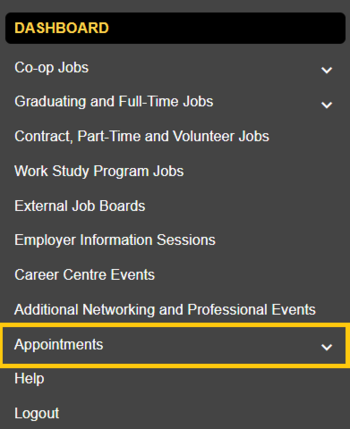
- Select Appointments from the navigation menu
- Select the type of appointment module you would like to book:
- Drop-ins – Centre for Career Development (for 20 minute same-day appointments with a Career Mentor and Outreach Associate).
- Appointments - Centre for Career Development (for 30 to 60 minute appointments with a career advisor)
- Choose book by "Appointment Type" or by "Appointment Provider" and continue to select from the options provided to you
Having trouble booking an appointment? Contact us through our live chat.
Note: Some individuals may have more than one active WaterlooWorks (WW) account. For example, if you are an alum and an active student you will have two accounts. If you are an active student, use your student account (student ID) to log in to WW to book student appointments.
Using AI in your job search
Let’s talk generative AI! Career advisors are available to discuss how you can responsibly use Generative AI (Gen AI) technologies like Microsoft Copilot (available through your UWaterloo account) to boost your job search and career development efforts.
When used effectively, Gen AI can help to brainstorm, draft, and revise application documents and to prepare you for interviews, networking events, and more. Career advisors can provide you with helpful prompts to get you started or review application documents you drafted with the help of Gen AI. Check out using Gen AI in job applications on CareerHub.
If not tailored properly, AI-generated content is easy for employers to identify. Gen AI tools can produce highly generic application documents, misrepresent your experience and/or leave you unprepared to talk about your experience during interviews. We’re here to support you in avoiding these common issues!
Looking for general guidance on how to use these tools? Check out the university’s guidelines on artificial intelligence use.
Attending an appointment
After booking your appointment, you’ll receive a confirmation email. Bring any digital or hard copies of documents you'd like reviewed as well as other relevant materials (i.e., job descriptions, résumé and cover letter, etc.).
In-person appointments in the Tatham Centre:
- When you arrive, please check in at the front desk
- We suggest bringing a laptop or other device with you to facilitate digital sharing of your résumé, cover letter or CV as needed
- To reduce the spread of illness, complimentary hand sanitizer is available throughout the building. If interested, complimentary masks are available at the front desk
WaterlooWorks webcam:
- We recommend using a PC or laptop for best experience, as well as Chrome, Firefox or Safari as the browsers
- Click on Dashboard from the left navigation bar
- Click on “view” to see “Today’s webcam appointments and/or interviews”
- Select “Join”. You can join the appointment up to ten minutes prior to the start
- Advisors will join the call when available

Teams and Zoom:
- The career advisor will send the link prior to the appointment. Check your UWaterloo email
- The advisor will reach out by phone if there are connection issue
Phone appointments:
- Please be ready for the call 10 minutes before your appointment starts in case the advisor needs to reach you
- If you are unable to connect, please contact the Client Support team via live chat
Connecting from China:
If you are living and studying in China, you may experience a slow connection, increased latency and inconsistent access to CCD services.
To improve your experience, visit:
Cancelling an appointment
You can cancel your appointment up to 30 minutes before your scheduled appointment time. Cancel through any of the following methods:
-
Using the available ‘Cancel’ button under the ‘Appointments’ tab on WaterlooWorks
-
Calling us at 519-888-4047 between 8:30am and 4:30pm
-
Visiting us in person at the William M. Tatham Centre (TC)
We keep it confidential
Before booking an appointment, please read our confidentiality statement. By booking an appointment, you are agreeing to the terms of our appointment confidentiality policy.