Design team members: Cat Hay and Linden Barton
Supervisor: Prof. Catherine Burns
Background
Math skills are important for success in both school and everyday life. Since math is linear and each step follows logically from previous steps, attempting to learn math without understanding previous underlying concepts will only encourage more problems in the future (1). It is expected that students who have a strong knowledge of the fundamental concepts learned in the grade 9 and 10 curriculum will be more encouraged to continue math studies and enjoy related fields, such as science and engineering.
Psychologist Howard Gardner’s theory of multiple intelligences suggests that humans possess several types of intelligences and that no two humans exhibit precisely the same profile of intelligences (2). These intelligences include: visual (spatial), aural (auditory-musical), verbal (linguistic), physical (kinesthetic), logical (mathematical), social (interpersonal), and solitary (intrapersonal). Each of these styles has been related to particular brain regions and processes, which govern how information is represented, recalled, and processed (3). Research shows that combining multiple brain areas in learning helps strengthen memories.
Traditional teaching methods, such as blackboards, overheads, and textbook-based activities, mainly focus on accommodating visual, aural, verbal, logical, and solitary learning styles through techniques such as textbook-based activities and lectures. More recent teaching tools include online software (java applets, quizzes, and videos), licensed software (Maple, Geometer’s Sketchpad, and TI InterActive), physical manipulatives (Alge-Tiles and Geoboards), and interactive technology (SMART boards and tables, Wii-based activities, and mixed reality learning environments). While many of these tools are interactive, they do not adequately address the needs of kinesthetic learners. The 2007 Curriculum Implementation Intermediate Math (CIIM) review confirms that the use of manipulative tools in grades 9 and 10 academic programs is often undervalued, even though research shows that these tools help all learners (4).
Project description
Current high school math curriculum does not address the needs of kinesthetic learners and may result in them being less likely to continue math studies and pursue related fields, such as science and engineering. We would like to design an interactive tool to teach grade 9 and 10 academic students spatial concepts in a classroom setting.
The following constraints were derived from this problem statement:
- The user must be able to physically interact with the system.
- The system must apply concepts in the high school math curriculum.
- The system must teach concepts from multiple concepts or units.
- The system must teach spatial concepts
Several criteria were established to measure the effectiveness of product concepts in meeting design objectives. These criteria include: cost, how much fun the product is to use, the number of concepts covered, the degree of physical interaction, the amount of training required, the amount of supervision required, and the ease with which the product can be integrated into a classroom setting.
Design methodology
The emerging research area of interactive surfaces includes tabletops, walls, and floors that function as digital displays with touch and stylus-based inputs. These devices are often collaborative in nature. Surface tables offer direct hands-on manipulation of objects on large surfaces. They are interactive in nature and can be shared in a classroom setting, making them more cost-effective than personal computers or tablet PCs. According to CNN, estimates indicate that touch technology sales will be more than $3.66 billion this year and $10 billion in the next five years (5).
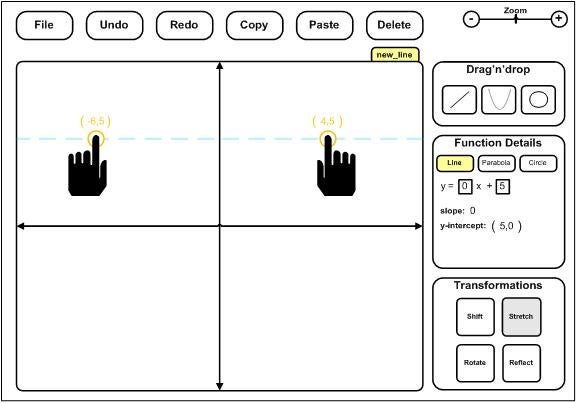
To meet the needs of kinesthetic learners, a surface table application is developed for use in a classroom setting. This application will allow students to build and transform functions and shapes with their hands, while observing the impact on relevant properties.
Using touch and gestures, students can add pre-built functions with a drag and drop toolbox and zoom or pan within the graph. Shifting, stretching, rotating, and reflecting a function or shape can be accomplished directly on the graphing space or using the transformations toolbox. Meanwhile, function equations and relevant properties are dynamically updated in the Function Details toolbox. Here users can also enter equation coefficients using a keypad, which edits or creates new functions and shapes. Users can toggle between the various forms of an equation taught in the curriculum.
A user-centered design methodology is employed in this project to ensure the final design meets the needs of both teachers and students. This process is outlined in the following diagram (6).
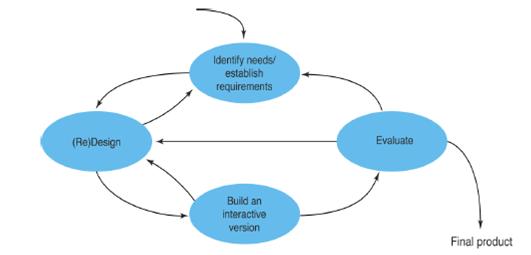
Design concepts are evaluated against the criteria from questionnaires and interviews with four teachers, one department head, two first year university professors, and a representative from the Centre for Education in Mathematics at the University of Waterloo. Local teachers will review low-fidelity prototypes, which include sketches and storyboards, to get feedback on the interface and functionality.
Minimal interaction will be required during the software development phase. Software will be developed using Microsoft Expression Blend and Visual Studio programs. Expression Blend is used to design the interface and creates a corresponding .xaml file which interacts with the C# files produced in Visual Studio for functionality. To date, software has been explored through peer tutorials and sample applications.
More extensive usability testing will be performed with these teachers when the software is developed. Minor revisions may be made to the prototype after this testing.
References
1. Teaching Quantitative Methodology to the Math Averse. Buchler, Justin. 42, s.l. : Cambridge University Press, June 26, 2009, Political Science & Politics, pp. 527-530.
2. Gardner, Howard. The Theory of Multiple Intelligences. [Online] 2008. [Cited: December 5, 2009.] http://www.howardgardner.com/Papers/documents/MI%20at%2025%20%204-15-08%202.doc.
3. Advanogy. Overview of Learning Styles. Learning Styles Online. [Online] 2007. [Cited: December 5, 2009.] http://www.learning-styles-online.com/overview/.
4. Suurtamm, Christine and Graves, Barbara. Curriculum Implementation Intermediate Math. Ottawa : University of Ottawa, 2007.
5. Thai, Kim. Touch Technology: A Round Up. Fortune Brainstorm Tech. [Online] CNN, November 9, 2009. [Cited: December 5, 2009.] http://brainstormtech.blogs.fortune.cnn.com/2009/11/09/touch-technology-a-round-up/?section=magazines_fortune.
6. Sharp, H., Rogers, Y. and Preece, J. Interaction Design: Beyond human computer interaction, 2nd edition. New York : John Wiley and Sons, 2007.