Kuali Curriculum Management (CM) proposal forms include a Duplicate feature that allows proposers to copy an existing curriculum record or draft proposal as a basis for a new draft proposal, where content is copied over from most form fields. However, Duplicate can only be used in certain scenarios. In fact, there are even a few scenarios where the Duplicate feature should not be used because it will cause issues with our integration with the Quest student information system.
When we recommend to use the Duplicate feature
The following scenarios outline acceptable uses of the Duplicate feature:
- Creating multiple new course proposals with similar base information
A set of new cross-listed courses need to be created at the same time. First create one course, then use Duplicate and update the necessary information on the second course. - Creating multiple new program/plan proposals with similar base information
A set of multiple new programs/plans for the same field of study (e.g., a new set of three-year general, four-year general, honours plans), or the same specialization (for different field of study) need to be created at the same time. First create one program/plan, then use Duplicate and update the necessary information on the subsequent program/plan(s). - Creating a new program or plan that has similarities to an existing one
A brand new program/plan needs to be created, and much of the information that will be input in the proposal form is already present on an existing program/plan record. To save time, the proposer uses Duplicate to create a copy of the existing program/plan they can modify to suit the new program/plan. - Creating a new cross-listing for an existing course
A new cross-listed course will be added to an existing course. The existing course should be duplicated because the same Quest Course ID will be used for each course record in the cross-listed set and we want the Quest Course ID to appear on the new offering. By using the Duplicate feature, system administrators do not have to manually intervene and add the information into the read-only field. Follow the Add new course to existing course cross-listing instructions.
Instructions are available for creating a new proposal using the Duplicate feature.
When the Duplicate feature cannot be used
With the exception of creating cross-lists, the Duplicate feature cannot be used on existing course records, as this will cause the course's Quest Course ID information to be wrongly brought over on the duplicated proposal and a Quest Course ID cannot belong to more than one course. An incorrectly duplicated proposal will need to be denied and deleted. However, if this error is only caught further down the workflow, system administrators can intervene by manually removing the Quest Course ID information, as well as the Offering Number (which both have to be blank for new courses for Quest integration); this can be requested via a ticket to our support portal.
How to know when a proposal has been duplicated
When reviewing proposals as an approver, it is possible to identify when a proposal was created using the Duplicate feature via the Audit Log. If a proposal or record was created using the Duplicate feature, the first occurring (or oldest) Action listed in the Audit Log will be Clone.
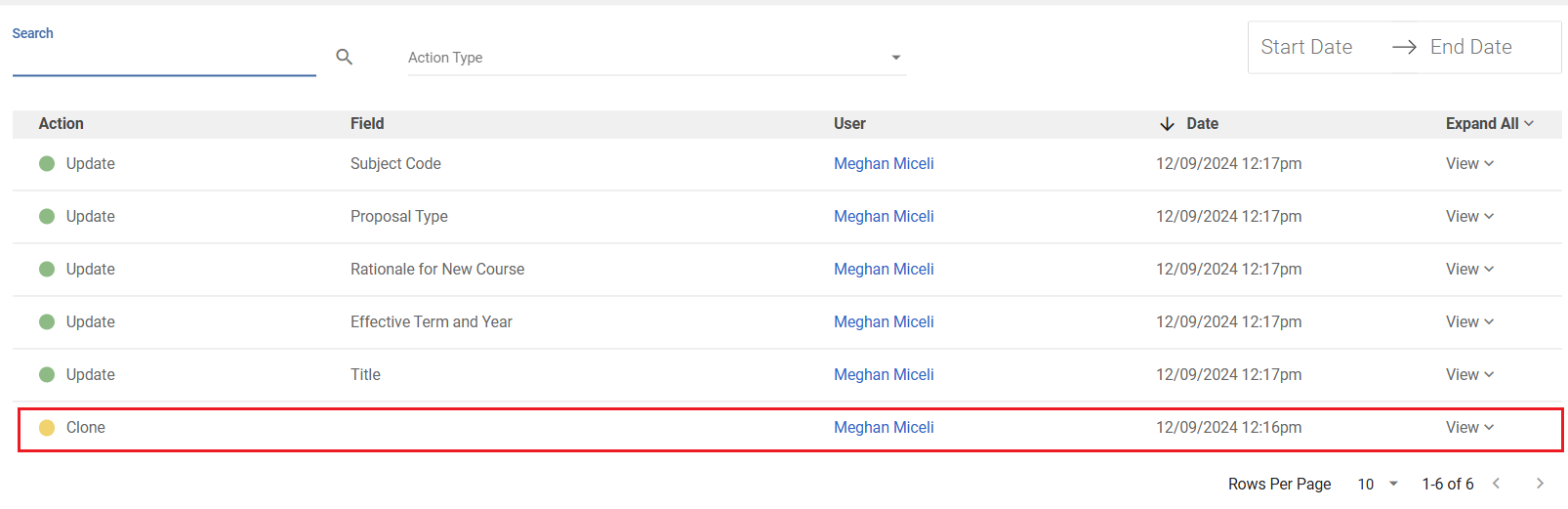
Another tip: If the proposal is a course and proposal type is New and there is already a Quest Course ID in the read-only field, it was likely duplicated, because that field should be blank (unless it is a cross-list of an existing record). You can verify using the Audit Log. If that is the case, the proposal should be deleted, or, a support ticket will be required to remove the Quest Course ID from the read-only field.
Questions
Have questions about the Duplicate feature? Reach out through the support portal.