When creating or updating content that crosses proposals, the order you work on the applicable proposals is an important factor.
Also refer to the details about cross-listed courses.
Adding a new course to an existing course
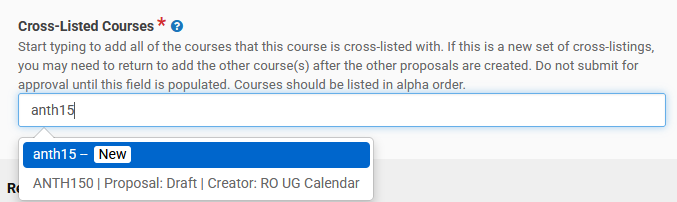
The proposal for the new course needs to be drafted before it can be added to the existing course. Once drafted, it will become visible to select from the Cross-Listed Courses field.
Creating a new course set
Follow the steps outlined on how to create new cross-lists. For a pair, you will need to be working on two drafts (or co-ordinating with another proposer) simultaneously:
- Create the first course (draft).
- Create the second course (draft).
- Add the drafted second course to the first course's Cross-Listed Courses field.
When needing to add a new course to a rules field, that course needs to have been drafted and submitted for approval (i.e., be in the workflow; Under Review status) to be able to see it and select it.
Rules fields this applies to:
- Prerequisites (Courses form)
- Corequisites (Courses form)
- Antirequisites (Courses form)
- Course requirements (units) (Programs & Plans form)
- Course requirements (no units) (Programs & Plans form)
- Required Courses (Term by Term) (Programs & Plans form)
- Course Lists (Programs & Plans form)
- Specializations (Programs & Plans form)
Tip: If you are not done making changes to the new course you are trying to add to another proposal, you can:
- Submit the new course to workflow.
- Update the proposal where you are trying to add the new course.
- Choose to withdraw the new course proposal to keep working on it.

- When ready, resubmit the new course proposal to workflow.
When needing to add a new plan to a rules field, that plan needs two things to be true:
- to have a CM Program Code assigned to it; and
- to have been drafted and submitted for approval (i.e., be in the workflow; Under Review status) to be able to see it and select it.
Rules fields this applies to:
- Prerequisites (Courses form)
- Corequisites (Courses form)
- Antirequisites (Courses form)
- Specialization is available for students in the following majors (Programs & Plans form)
- Specializations List (Programs & Plans form)
Tip: If you are not done making changes to the new plan you are trying to add to another proposal, you can:
- Submit the new plan to workflow.
- Update the proposal where you are trying to add the new plan.
- Choose to withdraw the new plan proposal to keep working on it.
- When ready, resubmit the new plan proposal to workflow.
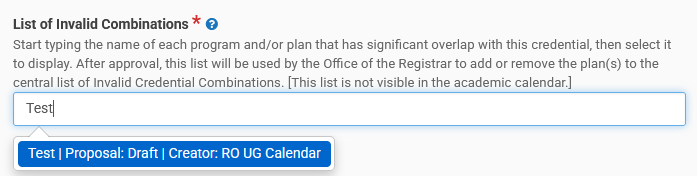
When needing to add a new plan to the List of Invalid Combination field, that plan needs two things to be true:
- to have a CM Program Code assigned to it; and
- to have been drafted to be able to see it and select it.
See Frequently Asked Questions.
For new plans/programs:
For new courses:
For number/plan name changes:
If a course is being renumbered (subject code or number) or a plan is being renamed, only the old number/name will display on associated proposals. The system will automatically update it (everywhere) once it becomes a record (at the end of the governance approval process and after the post-approval work is complete).